
Choose RadBoard if you want a radiology-focused job search across 5,000+ positions from 20 sources; choose LinkedIn if you want to find recruiters, research professional connections, or explore careers beyond clinical radiology. In 2026, the difference is focused opening discovery versus a professional network that also carries jobs.
- RadBoard vs LinkedIn: RadBoard wins for focused radiology job discovery; LinkedIn wins for professional networking.
- RadBoard aggregates 5,000+ radiology positions from 20 sources, with AI-powered search and swipe-to-save features.
- LinkedIn is best for recruiter connections, professional profiles, and searches beyond clinical radiology.
- Use either platform to find leads; verify case mix, call expectations, and contract terms directly with employers.
Why this matters
A radiologist choosing a job platform has two separate tasks: finding suitable openings and learning whether the practice deserves an application. A listing search and a professional network solve different parts of that decision. Treating them as interchangeable leaves part of your search unfinished.
For your 2026 search, start with the task you need to complete. If you already know your subspecialty and preferred practice setting, prioritize opening discovery. If you need introductions, background on a department, or a route into industry, prioritize people and professional context.
The distinction also prevents a bad comparison: a large professional network is not automatically a better radiology job catalog, and a specialist catalog is not automatically a better networking platform. Neither platform's size establishes the quality of a particular offer.
At a glance
| Dimension | RadBoard | |
|---|---|---|
| Best for | Radiologists seeking clinical career opportunities | Professionals seeking connections, recruiters, and broader career options |
| Opening discovery | Aggregates 5,000+ radiology positions from 20 sources | General job search across occupations and industries |
| Search approach | AI-powered search focused on radiology opportunities | Job search alongside professional and company searches |
| Shortlisting | Swipe-to-save features | Saved jobs within a broader professional platform |
| Professional networking | Opening discovery is its stated purpose | Profiles, connections, and professional conversations |
| Nonclinical exploration | Radiology-focused career search | Cross-industry job and professional discovery |
| Employer research | Start with the opening and investigate the practice | Company pages and employee profiles provide research starting points |
| Offer verification | Confirm details directly with the employer | Confirm details directly with the employer |
| Pricing model | Check current access terms before choosing | Basic access with optional paid subscriptions |
| Standout feature | Radiology aggregation plus search and swipe-to-save | A professional network connected to job search |
RadBoard wins for radiology opening discovery
The specialist platform is the better starting point when your immediate goal is to find radiology positions. Its stated scope is 5,000+ positions aggregated from 20 sources. That gives you a radiology-centered place to begin rather than a general employment search.
The benefit is consolidation. You can start with a specialist catalog instead of treating each source as a separate research project. The limitation is equally important: aggregation does not establish that every position is unique, suitable for you, or fully described.
LinkedIn remains useful when you want to search a named employer or connect a vacancy with people at that organization. Its general scope also serves searches involving several occupations. That breadth is less central when you have already decided to remain in clinical radiology.
Keep catalog size separate from market evidence. The brand's 2026 US Radiology Job Market Report describes analysis across 3,700+ active listings; the platform description cites 5,000+ aggregated positions. Those are different scopes, not interchangeable counts or evidence of growth.
Judge discovery by the relevant openings you can investigate, not by the largest headline count. A suitable subspecialty role deserves more attention than a long list of positions outside your requirements.
The specialist search wins when the target is a radiology role
An AI-powered search interface is part of the radiology platform's stated offering. That makes it a distinct option for physicians who want to search within a specialist career catalog rather than begin with a general professional network.
Write your requirements before searching. Separate the clinical work you want from the conditions you need: breast imaging versus general diagnostic coverage, for example, and onsite work versus remote reading. Then assess whether each result actually satisfies both.
LinkedIn is the better search environment when the target is a person, company, or professional connection rather than just an opening. Searching for a department leader and searching for an attending vacancy are different tasks. Use the interface that matches the task.
Neither search approach replaces reading the position description. A result that matches your wording still needs confirmation of case mix, schedule, location, and eligibility requirements.
The specialist search wins on focus, not on a claimed accuracy advantage. No hiring outcome or search-quality score is needed to make that narrower distinction.
Swipe-to-save wins for a browse-and-shortlist workflow
The radiology platform explicitly offers swipe-to-save features. That is a good fit when you want to review openings and keep candidates for a more detailed comparison later. Saving is a screening action, not an endorsement of the employer.
LinkedIn also supports saving jobs. Its advantage is keeping job activity within the same professional environment you use for profiles and connections. Choose that workflow if your search regularly moves between a vacancy, an employee profile, and a recruiter conversation.
For a browse-first radiology search, swipe-to-save is the more directly matched feature. For a relationship-first search, the surrounding professional network matters more than the saving action itself.
Keep a separate decision record for your shortlist:
- Clinical scope and expected general coverage.
- Schedule, call, and onsite obligations.
- Practice structure and employment arrangement.
- Questions that require an employer response.
A saved opening is a lead. Do not treat it as a verified match until the employer answers the questions that determine whether you would accept the role.
LinkedIn wins for recruiter and colleague connections
LinkedIn is the better choice when your next step is finding a person rather than finding another listing. Professional profiles and connections are central to the platform. You can use them to identify recruiters, former colleagues, and people associated with a target organization.
That is particularly useful when you already have an employer shortlist. A colleague's introduction gives you a different route into a conversation than a vacancy alone. It does not guarantee an interview or establish that the practice has an appropriate opening.
The limitation is effort: a profile is not a referral, and a connection is not a substantive answer about working conditions. Ask specific questions instead of sending a generic request to discuss opportunities.
For example, identify your training, desired clinical scope, geographic constraints, and reason for contacting that person. Keep sensitive application or employment details out of public posts.
The specialist platform's stated strength is opening discovery. If introductions are the bottleneck, read the guide to working with a radiology recruiter and use LinkedIn for the people-search part of the process.
LinkedIn wins for exploring work outside clinical radiology
A general professional network is the better starting point when your career question extends beyond reading studies or performing procedures. LinkedIn supports job and professional discovery across industries, making it useful for exploring medical affairs, informatics, consulting, and other nonclinical directions.
Search by function as well as specialty. An industry role relevant to your medical background does not have to use radiologist in its title. Read the responsibilities and qualification requirements before deciding that your clinical experience fits.
The tradeoff is relevance. Broader searches require you to distinguish positions that need physician expertise from roles with different credentials or experience expectations. A familiar healthcare employer name does not resolve that distinction.
For a 2026 career change, use professional profiles to study how people describe their responsibilities and experience. Treat those profiles as examples, not proof that the same transition is available to you.
LinkedIn wins for career breadth; the specialist catalog wins when clinical radiology is already the destination. Do not force a focused job platform to answer a cross-industry career question.
LinkedIn wins for people-based employer research
Company pages and employee profiles make LinkedIn a useful starting point for researching who works at an organization. That context helps you identify people to contact and understand how they describe their roles.
Its limitation is that profiles and posts are not an independent assessment of practice culture. They do not establish actual call burden, staffing adequacy, partnership terms, or the experience of every physician in the group.
A job catalog gives you a different starting point: the advertised role. Use its description to build an interview agenda, then seek direct answers from the hiring team and physicians doing comparable work.
Ask whether the advertised subspecialty focus reflects routine assignments. Clarify who covers absences, how schedules are set, and what happens when demand exceeds staffing. Those answers matter more than a polished employer page.
LinkedIn wins for identifying people to ask, not for certifying employer quality. Keep that boundary clear when evaluating a practice.
Both require direct verification before you accept an offer
Neither a specialist search platform nor a professional network replaces employer due diligence. For a 2026 application, verify the opening itself, the identity of the hiring contact, and the material terms before making commitments.
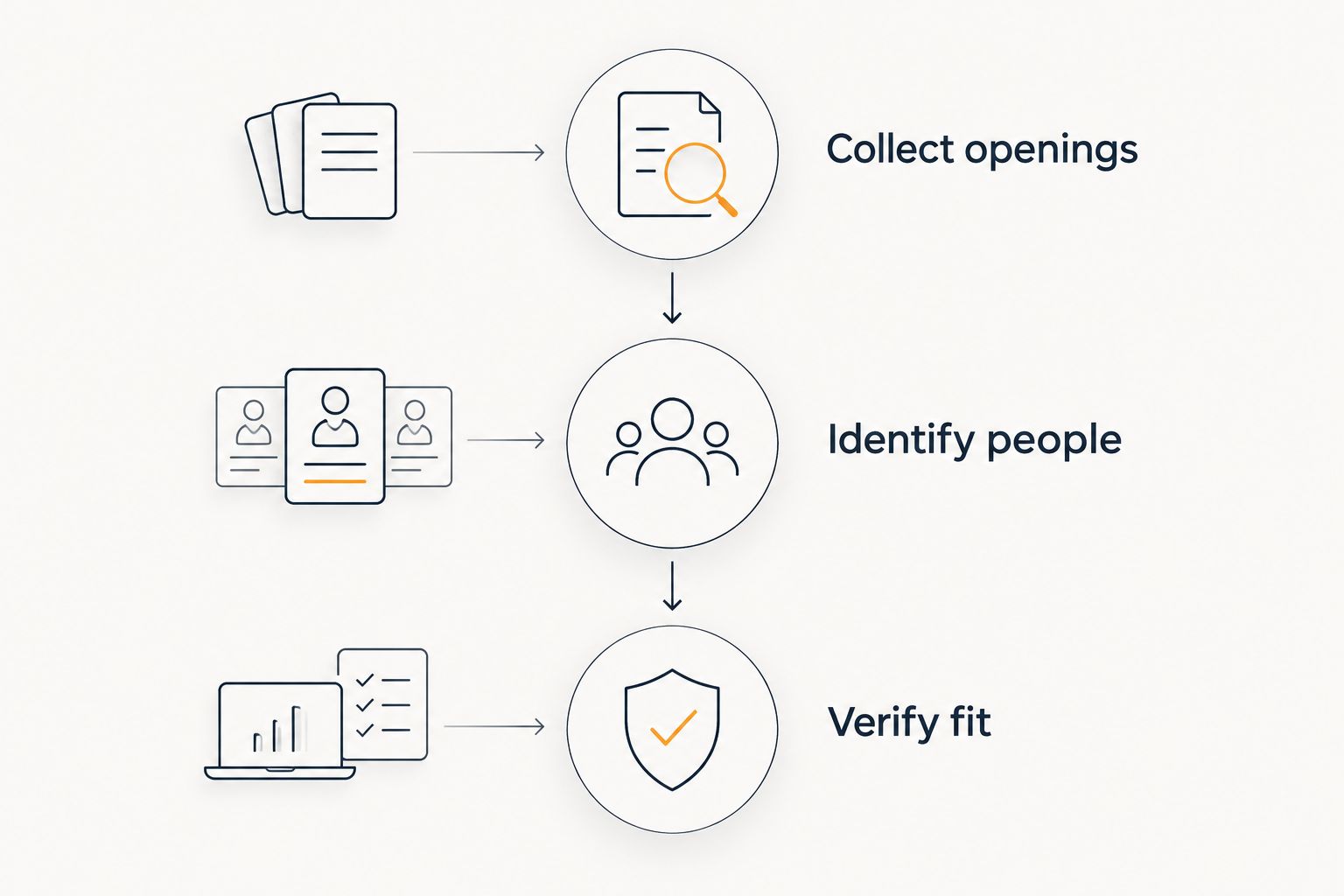
Use the platforms for complementary tasks rather than repeating the same search everywhere. Collect candidate openings, identify useful contacts, and then resolve the questions that affect acceptance.
- Collect openings: Find positions matching your intended clinical work.
- Identify people: Locate hiring contacts and physicians with relevant practice experience.
- Verify fit: Confirm duties, schedule, eligibility, and written employment terms.
This sequence keeps a recruiter conversation anchored to a real decision. It also prevents networking activity from becoming a substitute for evaluating the job.
Pricing: compare access terms, not assumed value
LinkedIn offers basic access and optional paid subscriptions. The decision is whether a paid feature supports a specific task in your search, not whether paying makes you a more serious applicant.
For the specialist platform, review current access terms before committing. Check which search and saving functions you can use, whether any recurring commitment applies, and how the terms fit your intended workflow. Do not assume its access model matches LinkedIn's.
Predictable access matters when you plan sustained use; flexibility matters when you need a platform for a defined search task. Judge either arrangement against the functions you will actually use.
Neither platform wins on cost in this comparison. In 2026, choose the workflow first and evaluate current terms second. A subscription does not verify an opening, improve a contract, or replace a useful employer conversation.
Final verdict: choose by your next task
Choose RadBoard if you are a clinical radiologist building a shortlist
RadBoard is best for radiologists who want focused opening discovery rather than a general professional network. Choose it when your destination is a radiology role and you want aggregation, AI-powered search, and swipe-to-save in that search process.
Your next move is to define acceptable clinical scope and working conditions, then investigate matching positions. Add networking when a specific opening raises questions that a listing cannot answer.
Choose LinkedIn if you need relationships or a broader career direction
LinkedIn is best for radiologists whose next step is a recruiter connection, colleague introduction, employer contact, or nonclinical career search. Choose it when the missing piece is a person or a professional path rather than another radiology vacancy.
Your next move is to identify relevant people and ask a focused question. Keep opening discovery separate so that professional activity leads to an actionable shortlist.
| Dimension | Winner |
|---|---|
| Best for clinical radiology opening discovery | RadBoard |
| Specialist search focus | RadBoard |
| Browse-and-save radiology workflow | RadBoard |
| Recruiter and colleague connections | |
| Nonclinical career exploration | |
| People-based employer research | |
| Offer verification | Tie: direct employer checks required |
| Cost comparison | No winner: evaluate current access terms |
FAQ
Is RadBoard better than LinkedIn for radiology jobs?
RadBoard is the better starting point for focused radiology opening discovery, while LinkedIn is better for professional networking. The specialist platform aggregates 5,000+ radiology positions from 20 sources and offers AI-powered search and swipe-to-save features.
Should I use both platforms for my radiology job search?
Use both when you need opening discovery and professional connections. Give each a distinct task: build your clinical shortlist in the specialist catalog, then use LinkedIn to identify relevant people.
Is LinkedIn useful for finding radiology recruiters?
LinkedIn is useful for identifying radiology recruiters through professional profiles and connections. Confirm whom a recruiter represents and ask about specific roles that fit your clinical scope.
Does the bigger platform have more suitable radiology jobs?
Platform size does not establish which platform has more jobs suitable for you. Compare relevant openings against your subspecialty, location, schedule, and employment requirements.
Which platform is better if I want to leave clinical radiology?
LinkedIn is the better starting point for exploring work across industries and professional functions. Search by responsibilities and qualifications as well as physician or radiologist job titles.
Do I need a paid subscription to search on LinkedIn?
LinkedIn provides basic access alongside optional paid subscriptions. Review current feature terms and pay only when a specific function supports your search.
Can either platform verify a radiology employer's working conditions?
Neither platform replaces direct verification of working conditions. Ask the employer and physicians in comparable roles about case mix, call, staffing, and written contract terms.
One last thing
Before applying, turn every attractive phrase into a question. Subspecialty-focused should prompt you to ask about general coverage; remote should prompt you to ask about onsite obligations; partnership track should prompt you to ask for written eligibility and ownership terms.
The best platform finds the lead. Your questions determine whether the job belongs on your final shortlist.