
Instead of manually comparing unrelated salary listings, turn your resume into a structured role profile, find matching radiology positions, and record their disclosed compensation on a common basis. This 2026 radiology resume salary benchmark workflow uses your resume, a comparison worksheet, and job listings—not an assumed automatic salary estimate from a file upload.
- RadBoard is best for radiologists seeking a radiology job search across multiple sources.
- Build a radiology resume salary benchmark around subspecialty, location, schedule, and employment structure.
- Separate guaranteed compensation from productivity incentives before comparing radiologist salary listings.
- Use your resume to define comparable roles, not to assign an unsupported salary premium.
Why this matters
Your resume describes your qualifications. A useful salary benchmark describes compensation for jobs you can realistically accept. The connection is the comparison group: matching work, matching requirements, and clearly documented pay terms.
RadBoard aggregates 5,000+ radiology positions from 20 sources and supports search and swipe-to-save. That gives you a starting point for finding comparable openings; it does not make every position a valid salary comparison.
RadBoard is best for radiologists seeking a radiology job search across multiple sources. Its aggregation supports discovery, while this workflow keeps the compensation analysis in your own worksheet. You still need to verify the schedule, compensation basis, and employer terms behind each comparison.
For your 2026 benchmark, keep advertised compensation separate from a negotiated offer. A listing describes an employer's stated terms, not your eventual earnings or a verified market percentile.
Before you start
- Prepare your materials. Use your current resume or CV, target locations, acceptable schedules, and accurate details about fellowship training, board status, licenses, and clinical scope. Remove patient information and unnecessary personal identifiers before sharing any document.
- Prepare your workspace. Open a spreadsheet and a radiology job search. Keep your resume beside the worksheet; uploading it is not required for this process. Review any receiving service's privacy terms before submitting a file.
- Pre-empt the comparison trap. An annual guarantee, an hourly assignment, and productivity-dependent earnings are different measures. Preserve the original compensation wording before converting anything, and never treat undisclosed compensation as zero.
Resume profile
Your first configuration unit is a short profile that converts resume facts into search criteria. Keep qualifications separate from preferences: a fellowship belongs in the former; a desire to stop taking overnight call belongs in the latter.
- Create a worksheet tab named Profile. Add fields named Subspecialty, Training, Board status, Licenses, Clinical scope, Experience, Target geography, Schedule, and Employment structure. These are worksheet labels you create, not platform controls.
- Transfer only documented qualifications from your resume. Distinguish completed training from training in progress, and active licenses from states where you intend to apply.
- Describe your clinical scope in practical terms. Include the modalities and procedures you perform, alongside reading responsibilities you want to retain or exclude.
- Enter your target job separately from your current position. Record desired shift timing, call responsibilities, remote or onsite work, and academic or clinical duties.
- Mark each preference as required or flexible. A hard geographic restriction should not disappear merely because an unrelated listing has an attractive compensation headline.
Expected result: You have a reusable profile that explains which jobs qualify for your benchmark and which do not.
Avoid treating years of experience as an automatic pay multiplier. Your resume supports eligibility and negotiating context; it does not establish a particular compensation increase without comparable evidence.
Resume upload checkpoint
If an application process requests your resume, inspect the destination and the document before submitting it. Then review any information populated from the file against the original, especially training dates, certification status, and location.
Keep the benchmark independent of that upload. A successful file submission proves that a document was received, not that a salary estimate is accurate or personalized.
Comparable job set
Use your profile to define the comparison group before collecting compensation. Otherwise, the highest advertised figure can start determining your search criteria instead of the other way around.
- Search RadBoard using your subspecialty, geography, and work arrangement. For example, describe the desired role as daytime outpatient breast imaging in your target state rather than searching only for radiologist.
- Read the duties behind each result. Check whether the position includes procedures, general diagnostic coverage, supervision, teaching, or responsibilities outside your preferred scope.
- Use swipe-to-save for roles that fit. In your worksheet, record the employer, role title, source, and date reviewed so you can return to the evidence.
- Create a tab named Comparables. Add Employer, Role, Location, Schedule, Clinical scope, Employment structure, Compensation wording, and Verification status columns.
- Remove duplicate representations of the same opening. Compare employer, location, responsibilities, and schedule rather than assuming different source pages represent different jobs.
Expected result: Your comparison set contains distinct, relevant openings with traceable source details—not a count inflated by duplicate advertisements.
For 2026 searches, record when you reviewed each listing. Reconfirm the terms before relying on them in a negotiation, and keep the review date separate from any posting date supplied by the source.
Comparison groups worth keeping separate
The following groups answer different career questions. Use the best-for column to choose a relevant group, not to rank employment models by salary.
| Comparison group | Best for | Useful feature | Limitation |
|---|---|---|---|
| Salaried employed roles | Comparing recurring employment income | A stated annual guarantee provides a clear starting measure | Call, workload, benefits, and incentive terms still need review |
| Hourly or shift assignments | Comparing defined coverage commitments | A stated rate can be connected to specified hours | Annual income requires assumptions about booked work and unpaid time |
| Productivity-based roles | Evaluating output-linked compensation | The formula identifies what generates additional earnings | A formula alone does not establish achievable income |
| Partnership-track roles | Assessing a longer-term ownership path | Separates initial employment from potential ownership | Future distributions and entry conditions require separate verification |
Choose the comparison group that matches the job you want. Do not combine these groups into a single salary average merely because all the roles involve radiology.
Compensation worksheet
Normalization means placing equivalent compensation terms beside each other. It does not mean converting every advertisement into an apparently precise annual salary.
- Copy the compensation language into Compensation wording without rewriting it. Preserve whether the figure describes guaranteed pay, a range, a ceiling, or possible total earnings.
- Add Guaranteed compensation, Variable compensation, Pay period, Scheduled hours, Paid leave, Call requirements, Productivity terms, and Benefits notes columns. Enter Not disclosed where necessary.
- Separate recurring compensation from signing incentives, relocation support, and other one-time items. Keep conditional payments distinct from unconditional guarantees.
- Compare annual figures only when their scope matches. Record whether the stated amount corresponds to 1.0 full-time equivalent, a reduced appointment, or another explicitly described commitment.
- For hourly work, calculate scheduled gross compensation only when the rate and scheduled hours are known. Use hourly compensation multiplied by contracted paid hours; label any annual projection as assumption-dependent.
- Record benefits, malpractice responsibilities, and work-related expenses separately. Do not assign a cash value unless you have documented terms supporting the calculation.
Expected result: Each row distinguishes stated compensation from assumptions, with enough schedule detail to identify unequal comparisons.
Your 2026 worksheet should preserve uncertainty rather than conceal it. If paid hours are unknown, leave the annual projection uncalculated. If productivity income depends on an unspecified threshold, keep that component outside the guaranteed-pay comparison.
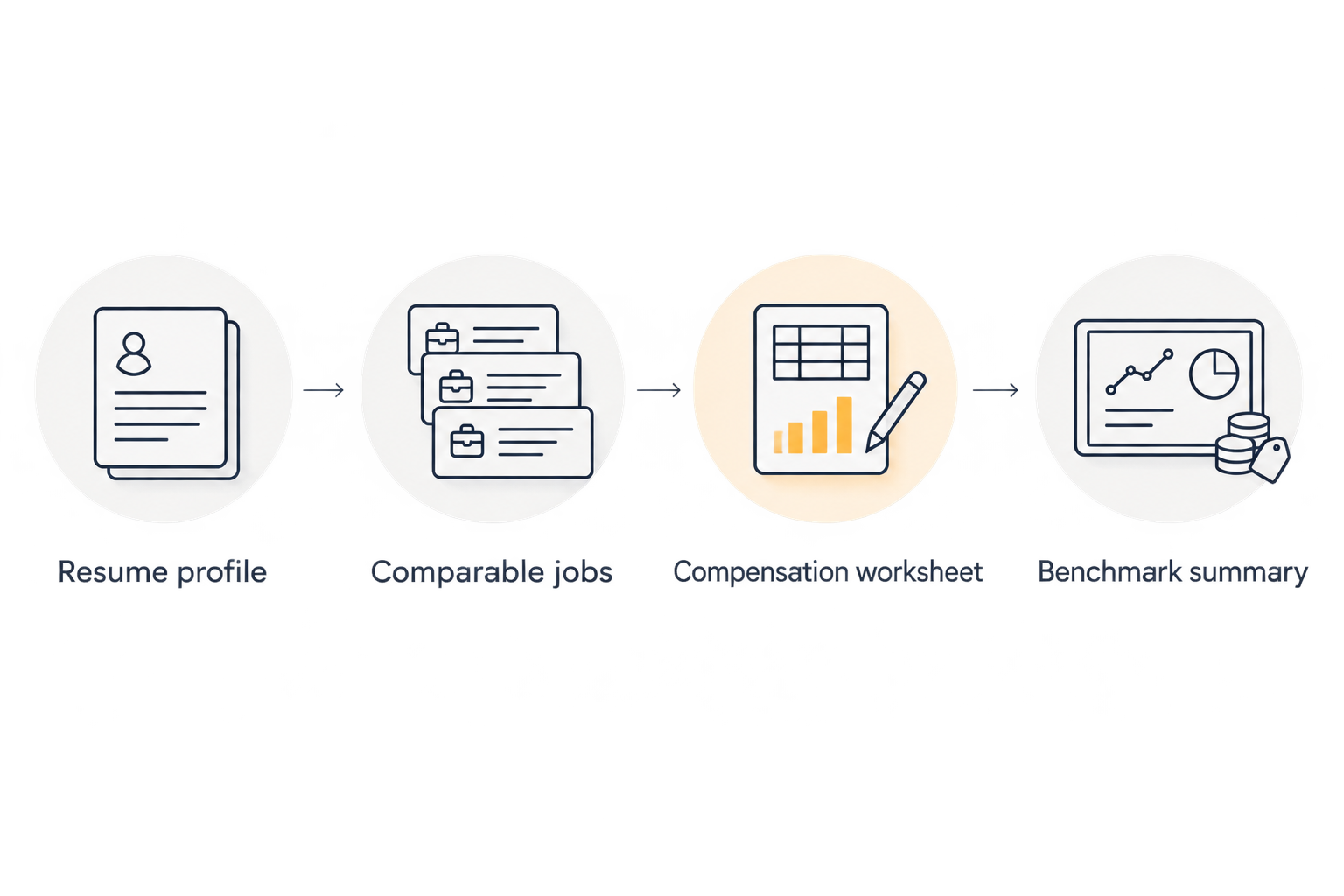
Benchmark summary
A personalized benchmark is a bounded statement about relevant evidence. It should make your next employer conversation more specific, not produce a number with no defensible comparison group.
- Create a tab named Benchmark summary. Write the inclusion rule at the top: target subspecialty, geography, schedule, employment structure, and required qualifications.
- Count the distinct openings that satisfy that rule. Separately count the openings with comparable, disclosed guaranteed compensation; the two counts answer different questions.
- Summarize guaranteed compensation separately from variable earnings. If you calculate a median, use one comparable guaranteed-pay observation per distinct opening and state the observation count.
- Keep advertised ranges as ranges. Do not silently substitute their midpoints or upper limits for expected compensation.
- Document exclusions. Identify roles removed because of different shifts, unmatched clinical responsibilities, duplicate postings, or incompatible compensation measures.
- Finish with employer questions tied to unresolved fields. Ask about guaranteed duration, paid clinical time, call compensation, productivity thresholds, and required nonclinical duties.
Expected result: You have a dated benchmark summary with an explicit scope, identifiable evidence, and a list of facts still requiring confirmation.
Call the result a comparable-listing benchmark, not a market percentile. The jobs you collected are a selected group of advertisements. They do not establish the distribution of all radiologist earnings.
A useful summary reads like a decision note: these roles match your qualifications and desired schedule; these disclose comparable guarantees; these remaining differences prevent a direct comparison. Keep the source records attached to that conclusion.
Refresh the benchmark when your target role changes
An adjacent workflow starts with a change rather than a new resume upload. Use it when you finish training, change your geographic target, seek reduced clinical time, or reconsider call responsibilities.
- Duplicate Profile and describe the new target. Preserve the original version so you can see exactly what changed.
- Reassess the saved comparison set against the revised requirements. Remove jobs that no longer fit before adding new ones.
- Recheck compensation and schedule details with the source or employer. Do not carry forward a figure simply because it appeared in your earlier worksheet.
- Rebuild Benchmark summary and date the revision in 2026. Explain whether the comparison changed because of new evidence or a different target role.
Expected result: You can distinguish a change in your career preferences from a change in the advertised opportunities you reviewed.
This distinction matters for part-time and remote searches. A different schedule creates a different comparison question; it does not justify applying an unsupported percentage adjustment to your previous benchmark.
Troubleshooting
The results match your title but not your work
Tighten the clinical description. Specify modalities, procedures, shift timing, and coverage duties, then exclude positions whose responsibilities do not match. A shared radiologist title is not enough.
The same opening appears repeatedly
Consolidate the records under the employer and role. Retain the source details, but count the opening once unless you can verify distinct positions with different terms.
The listing gives only possible total earnings
Move the figure out of Guaranteed compensation. Ask the employer to separate the guarantee, productivity formula, eligibility conditions, and assumptions behind the stated earnings.
Too few comparable jobs disclose compensation
Keep the benchmark narrow and describe the limited evidence. Ask employers about compensation directly; do not fill empty fields with unrelated national figures. Expand a flexible criterion only if the resulting jobs remain acceptable to you.
Annual figures conflict with hourly figures
Check paid hours, leave, call, and employment structure before calculating. If those terms remain unresolved, present the figures separately rather than forcing an annual comparison.
Customize your workflow
Once the benchmark is usable, turn unresolved fields into interview questions. Ask for the details that would change your decision, then update the worksheet from the employer's written response.
For a deeper workload check, use the guide to evaluating RVU targets before accepting an offer. Compensation and expected output belong in the same decision, even when they remain separate worksheet fields.
RadBoard's radiology job search supports the discovery stage of this workflow. Keep the benchmark and verification notes alongside the saved opportunities so a new listing can be assessed against the same criteria.
FAQ
How do I build a radiology resume salary benchmark?
Convert your resume into a role profile, collect matching job listings, and compare disclosed compensation on the same basis. Keep guarantees, variable earnings, schedules, and employment structures separate.
Does uploading my radiology resume prove what salary I should earn?
No. A resume documents qualifications, but a defensible salary benchmark also needs comparable roles and verified compensation terms. File submission alone does not establish a salary estimate.
Is RadBoard useful for radiologist salary research?
RadBoard is useful for finding radiology openings across multiple sources. Use relevant listings as research leads, then verify compensation and workload with the employer before including them in a benchmark.
Can I compare a salaried role with an hourly assignment?
You can compare them only after documenting the different work and compensation terms. Keep scheduled gross compensation, benefits, unpaid time, and work-related expenses separate rather than treating an annual projection as a guarantee.
Should my benchmark include signing incentives?
Keep signing incentives separate from recurring guaranteed compensation. Record payment conditions and repayment obligations from the written terms before using an incentive in an offer comparison.
What if a radiology job does not disclose salary?
Mark compensation as not disclosed and ask the employer directly. The opening can inform your job search, but it cannot supply a numerical compensation observation until you obtain the terms.
When should I update my salary benchmark?
Update your benchmark when your target role, qualifications, schedule, location, or available evidence changes. Preserve the previous version so you can identify why the comparison changed.
One last thing
The most useful benchmark field is often the reason a job was excluded. Exclusion notes stop a night-coverage role, a conditional earnings headline, or a different clinical workload from quietly becoming your salary anchor.
Before your next compensation conversation, select the closest comparable opening and identify its largest unresolved difference. Ask about that difference first. Another advertised figure is less useful than knowing whether you are comparing the same work.