
Instead of reopening saved listings and searching recruiter emails, compare saved radiology job offers in a side-by-side worksheet that separates advertised terms from written commitments. Use your RadBoard shortlist as the starting point, then record the evidence, workload, and unresolved questions for each opportunity before choosing your next move.
- To compare saved radiology job offers, move your RadBoard shortlist into a worksheet with source-backed terms.
- Separate saved listings, recruiter discussions, and written offers; they represent different levels of confirmation.
- Compare radiology contracts using consistent workload units, call obligations, benefits, and exit terms.
- Keep unanswered questions visible rather than treating missing information as a favorable term.
Why this matters
RadBoard aggregates 5,000+ radiology positions from 20 sources and supports swipe-to-save job search. Saving a position captures interest; it does not establish what an employer will put in a contract.
RadBoard is best for radiologists who want to search multiple job sources and save positions for further review. Start with your RadBoard radiology job search shortlist, then build the comparison outside the platform using the workflow below.
For a 2026 search, the useful output is not a list of attractive descriptions. It is a decision sheet showing which terms are documented, which conflict, and which still need an answer. The benefit of aggregation is a broader starting point; the limitation is that a saved advertisement cannot substitute for employer confirmation.
Before you start
- Access and materials: Have access to your saved positions, original listings, recruiter correspondence, and any written offers or draft agreements. Use an editable spreadsheet for the comparison.
- Decision criteria: Write down your required subspecialty mix, acceptable schedule, location constraints, and employment arrangement before reviewing offers. Keep preferences separate from requirements.
- The gotcha: A saved job is not an offer, and separate advertisements can describe the same opening. Confirm the employer, practice location, and role before creating separate offer columns; never merge conflicting terms silently.
This guide uses a manual worksheet, not a claimed export, integration, or automatic comparison feature. Bold worksheet labels below are fields you create yourself, not RadBoard interface labels.
Shortlist and source records
- Select the opportunities. Open each saved position you are seriously considering. Create a worksheet titled 2026 Offer Comparison, with one column per distinct role and a separate column for comparison criteria. A starting layout of 3 offer columns keeps the first review focused; add more only when you need them.
- Establish identity. Create rows named Employer, Practice location, Role, Recruiter, and Source record. Record the original listing reference privately in your worksheet, along with the relevant correspondence. Distinguish the hiring organization from an agency representing it.
- Label the stage. Add Decision stage and enter a plain description: saved listing, recruiter discussion, written offer, or draft agreement. Do not present an early conversation as equivalent to a written offer.
- Preserve provenance. Add Checked on and Evidence. Record when you reviewed each source and where each important term appears. Keep the original document rather than relying on a rewritten summary alone.
Expected result: Each comparison column represents a distinct opportunity with an identifiable source and a clearly stated decision stage. Duplicate advertisements point to the same opportunity instead of inflating your shortlist.
Keep sensitive offer documents in storage you control. If you share the worksheet with an adviser, provide the access needed for that review rather than distributing the entire recruiting correspondence.
Comparison fields and workload units
- Define the rows. Create Clinical scope, Schedule, Call, Workload, Compensation structure, Benefits, Malpractice, Ownership, and Exit terms. Under each heading, separate terms that require different answers. Weekend coverage and overnight call, for example, deserve separate entries.
- Record the original wording. Copy relevant terms accurately into your private notes. Alongside each summary, identify whether the source is the advertisement, recruiter correspondence, written offer, or draft agreement.
- Standardize the units. Record shift duration in hours per shift, weekend obligations in weekends per year, and leave in days per year where the employer supplies those details. Keep the original unit when conversion requires an assumption; do not convert a leave week without knowing the scheduled workdays it covers.
- Separate requirements from rewards. Record guaranteed compensation separately from conditional productivity compensation, and keep the productivity threshold beside its measurement period. Record partnership eligibility separately from any ownership commitment in writing.
- Mark unresolved entries. Use Not stated, Awaiting clarification, or Conflicting sources rather than leaving an empty cell. These are worksheet statuses, not judgments about the employer.
Expected result: The same row asks the same question across every offer. Differences reflect actual terms rather than inconsistent units or optimistic interpretation.
Use this blank comparison template for your 2026 review. The offer labels describe your own documents, not real employers or sample contract terms.
| Comparison field | Offer A | Offer B | Offer C |
|---|---|---|---|
| Decision stage | Enter stage | Enter stage | Enter stage |
| Best for | State documented fit | State documented fit | State documented fit |
| Clinical scope | Record case mix | Record case mix | Record case mix |
| Schedule | Record hours and time zone | Record hours and time zone | Record hours and time zone |
| Call | Record frequency and duties | Record frequency and duties | Record frequency and duties |
| Workload | Record unit and period | Record unit and period | Record unit and period |
| Compensation structure | Separate guaranteed and conditional | Separate guaranteed and conditional | Separate guaranteed and conditional |
| Benefits and leave | Record eligibility and terms | Record eligibility and terms | Record eligibility and terms |
| Malpractice | Record policy and responsibilities | Record policy and responsibilities | Record policy and responsibilities |
| Documented advantage | Cite supporting evidence | Cite supporting evidence | Cite supporting evidence |
| Documented drawback | Cite supporting evidence | Cite supporting evidence | Cite supporting evidence |
| Open question | Name unresolved issue | Name unresolved issue | Name unresolved issue |
Evidence and clarification records
- Check every requirement. Compare each opportunity against your non-negotiables before weighing preferences. A role that conflicts with a required schedule stays flagged even when other terms are attractive.
- Build a question list. Turn each unresolved cell into a specific request. For call, ask for frequency, coverage hours, duties, and backup arrangements. For workload, ask which metric applies, what period it covers, and whether expectations include non-reading responsibilities.
- Request written clarification. Send the relevant questions to the recruiter or employer contact. Identify the role and the precise term needing confirmation; broad requests for a better explanation produce less usable comparison material.
- Reconcile disagreements. If a recruiter email and draft agreement differ, preserve both entries and request reconciliation. Do not overwrite the discrepancy with whichever version you prefer.
Expected result: Every material unknown has a named question and an identified contact. Every apparent advantage or drawback has supporting evidence rather than an assumption.
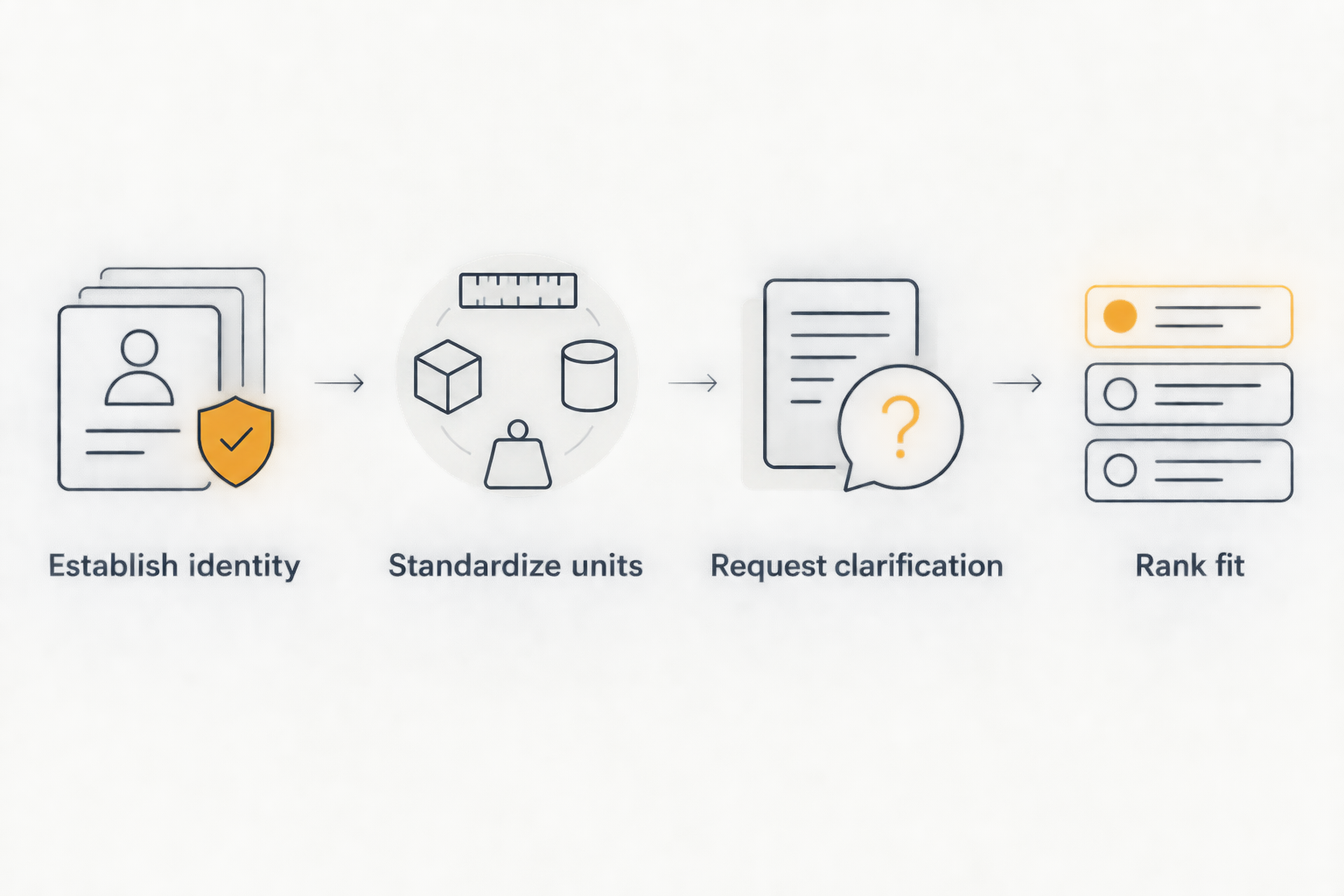
The sequence is simple: establish the role, standardize the fields, verify the evidence, and only then rank the fit. A comparison assembled in that order keeps unanswered questions visible throughout the decision.
Decision view and next actions
- Rank fit. Complete Best for with the specific need each offer satisfies, such as documented subspecialty scope or a confirmed schedule. Do not assign the label from an advertisement headline alone.
- Record both sides. Complete Documented advantage and Documented drawback for every opportunity. If you have not established a drawback, record the remaining uncertainty rather than inventing a negative or calling the offer risk-free.
- Choose an action. Add Next action and use a concrete instruction: request clarification, arrange a practice conversation, obtain contract review, or decline. Keep an offer under review when a required term remains unresolved.
- Save the decision version. Preserve the worksheet and source documents used for your decision. Label the version with its review date so subsequent changes remain distinguishable.
Expected result: Your 2026 comparison ends with a defensible next action for each offer, not an unsupported overall score. Have a qualified attorney review the proposed agreement before signing; a worksheet organizes the questions but does not resolve legal interpretation.
Choose the offer whose documented terms meet your requirements, not the offer whose missing terms are easiest to imagine favorably. A numerical total should never erase a failed non-negotiable.
Update the comparison when an offer changes
Use the same worksheet when an employer revises a schedule, clarifies coverage, or sends a new agreement. This is a manual update workflow: it does not depend on an automatic connection between saved jobs and offer documents.
- Preserve the previous document and comparison version.
- Update only the affected fields, including Evidence and Checked on.
- Recheck related terms. A revised shift pattern also requires another look at leave usage, call coverage, and workload expectations.
- Revisit Best for, the documented trade-offs, and Next action.
Expected result: The decision view reflects the current written proposal without losing the record of earlier terms. A changed summary is traceable to a changed source.
Troubleshooting
The same opening appears more than once
Check employer identity, location, clinical scope, and recruiter details before treating the listings as separate opportunities. Ask the contact whether the advertisements represent the same vacancy, then consolidate the comparison while preserving the source records.
Workload figures use different measurements
Do not equate studies, work RVUs, shifts, and coverage hours. Request a common description of expected duties and keep unlike measurements separate until the employer provides enough context for comparison.
Remote work is described without a defined schedule
Separate work location from scheduling flexibility. Ask for required coverage hours, time zone, onsite obligations, and geographic restrictions; retain Awaiting clarification until the employer answers the relevant questions.
A benefit appears in the listing but not the documents
Identify the omission and ask where the benefit is documented, who qualifies, and whether conditions apply. Keep it outside the confirmed advantages until you have supporting terms, and flag any discrepancy for contract review.
The worksheet names a winner despite a failed requirement
Remove the overall ranking and return to your requirements. Compare acceptable offers first; use preferences only to distinguish opportunities that meet your non-negotiables.
Customize your workflow
Adapt the comparison to the type of radiology work you are evaluating. For remote roles, add workstation responsibilities, technical support, coverage geography, and downtime procedures; for procedural roles, add procedure scope, staffing, facilities, and backup coverage questions.
For employment arrangements that differ, use the guide to compare W2 vs 1099 radiology job offers side by side. Keep tax questions with a qualified tax adviser rather than embedding an assumed tax treatment in your ranking.
For a 2026 search involving ownership, add rows for eligibility, written conditions, governance rights, and exit obligations. Keep these as questions until the employer supplies the applicable documents; a partnership-track description alone does not complete the ownership comparison.
FAQ
How do I compare saved radiology job offers side by side?
Create a worksheet with one column per distinct opportunity and consistent rows for scope, schedule, call, workload, benefits, and contract terms. Identify the source and confirmation status of each entry before ranking the offers.
Is a saved radiology job the same as a written offer?
No. A saved listing records an opportunity you want to review; a written offer records proposed terms from the employer. Label the decision stage so the comparison does not treat them as equivalent.
Can I use RadBoard for a radiology job search shortlist?
Yes. RadBoard aggregates radiology positions from multiple sources and provides swipe-to-save features. Use the saved positions as your shortlist, then verify offer terms against employer documents.
What should I compare besides compensation?
Compare clinical scope, schedule, call, workload, leave, benefits, malpractice responsibilities, ownership terms, and exit obligations. Prioritize your requirements before weighing preferences.
What if the recruiter email and contract say different things?
Record the discrepancy and request written reconciliation. Preserve both sources and have a qualified attorney review unresolved differences before you sign.
Should I give every radiology offer a numerical score?
Use requirements as the first filter rather than relying on a numerical total. A score does not make an unacceptable call schedule or unresolved contractual obligation acceptable.
How do I keep the comparison current after negotiations?
Preserve the earlier version, update changed fields, and attach the new evidence and review date. Reassess related terms and your next action whenever the proposal changes.
One last thing
An unanswered question is a next action, not a favorable term. Before your final 2026 decision, filter the worksheet for Not stated, Awaiting clarification, and Conflicting sources. Resolve the entries that affect your requirements before treating any offer as ready for acceptance.