
Instead of manually repeating your search across separate radiology job boards, use RadBoard to search 5,000+ positions aggregated from 20 sources, then swipe to save relevant opportunities. This 2026 workflow takes you from a defined search brief to a verified shortlist without treating a search match as proof that a job meets your requirements.
- RadBoard suits radiologists seeking radiology job boards aggregated search across 20 sources.
- Define subspecialty, geography, and schedule before searching; verify each requirement against the posting.
- Use AI-powered search for discovery and swipe-to-save for opportunities that deserve closer review.
- Keep one tracking row per opportunity, with unresolved questions and your next action.
Why this matters
An aggregated radiology search brings listings from multiple sources into one place. It does not replace your evaluation of clinical duties, call expectations, practice structure, or employment terms.
RadBoard is best for radiologists who want one search across multiple job sources. Its stated scope is 5,000+ radiology positions from 20 sources—not a guarantee that every position fits your subspecialty, credentials, or preferred schedule.
For your 2026 search, separate discovery from verification. Discovery identifies postings worth reading; verification establishes whether the actual role fits. Keep that distinction throughout the workflow, especially when a title sounds more specific than the duties described underneath it.
Before you start
- Prepare your search brief. Write your subspecialty, acceptable locations, preferred working arrangement, and start-date window. Separate requirements from preferences so you know what to relax when a search is too narrow.
- Prepare a tracking document. Use a spreadsheet or notes document that you control. Keep your CV ready for later employer conversations, but this workflow does not depend on uploading it or connecting another service.
- Check the hidden constraint: remote does not mean unrestricted. Before advancing a remote role, confirm the patient locations, required licenses, shift time zone, and any onsite responsibilities. A remote label alone does not answer those questions.
You do not need to connect the 20 underlying sources individually for this workflow. The sequence uses the platform's stated search and swipe-to-save functions, followed by your own review and tracking.
Your search brief
- Write 3 must-haves. Start with the clinical work you want, where you can work, and the schedule you can accept. For example: musculoskeletal imaging, a defined geographic area, and daytime work. Treat this as a sample brief, not a statement about any particular listing.
- List your exclusions separately. Record duties or arrangements you will not accept, such as overnight coverage or a required relocation. Keep exclusions explicit rather than expecting a search result to interpret them correctly.
- Add preferences. Include teaching, procedures, ownership structure, or a partnership path when those matter to your decision. Do not give a preference the same weight as a licensing requirement.
- Write one plain-language search request. Describe the position you want in a complete phrase. Start with the role and its essential constraints rather than a long paragraph about your career history.
A sample request is: Musculoskeletal radiologist seeking daytime work in my target state, with procedures preferred. This describes your intent; it does not establish that every returned posting satisfies it.
Expected result: You have a reusable brief that lets you judge results consistently. When a posting looks attractive, you can explain exactly which requirements it meets and which remain unanswered.
Choose the search scope deliberately
Use the following comparison to decide how much specificity belongs in your initial request. These are two ways to organize your search, not separate products or confirmed interface settings.
| Search approach | Best for | Advantage | Limitation |
|---|---|---|---|
| Broad discovery | Radiologists exploring adjacent roles | Keeps your starting request focused on the clinical role and a few constraints | Requires more manual screening of duties and schedule |
| Focused shortlist | Radiologists with firm requirements | Makes your non-negotiable criteria explicit from the start | Leaves less room to discover roles described with different terminology |
Start with focused criteria when your constraints are firm. Use broader discovery when you are still deciding which practice settings or working arrangements to consider.
Your aggregated search
- Open the platform and enter your request using its AI-powered search. Include your subspecialty and strongest constraints. Describe the work itself: reading duties, procedures, working arrangement, and geography.
- Review the posting text, not just the title. Compare each promising result with your brief. Look for the clinical responsibilities and requirements that support the match.
- Change one constraint at a time when revising the request. Broaden geography or remove a preference before changing a true requirement. Record what changed so you can compare the resulting searches.
- Keep useful wording in your notes. If postings describe relevant duties differently from your initial request, use that language in a second search. Do not assume every employer uses the same subspecialty terminology.
For a 2026 search, keep the employer's requirements distinct from your interpretation. A posting that mentions musculoskeletal imaging is not necessarily a subspecialty-only position; confirm what else the radiologist must read.
Expected result: You have a manageable set of postings to inspect and a repeatable search request. You also know which constraint you changed between searches, rather than repeatedly starting from memory.
Read these details before saving
Check the same elements across postings so a familiar title does not distract you from a different job:
- Clinical scope: modalities, subspecialty duties, general coverage, and procedures.
- Working arrangement: onsite, remote, or split-location responsibilities.
- Schedule: shift hours, time zone, weekends, call, and backup coverage.
- Eligibility: training, certification, licensure, and credentialing requirements.
- Practice structure: the employing or contracting entity and any stated ownership or partnership terms.
Mark an unstated detail as unconfirmed, not as a match. That single habit keeps your shortlist tied to evidence rather than assumptions.
Your saved shortlist
- Use swipe-to-save for postings that merit follow-up. Save a role when its stated duties fit your brief or when a specific unanswered question could determine fit. Do not save it solely because its title matches your search.
- Create 1 tracking row per opportunity. Record the employer or recruiting organization as identified, posting title, location, source reference, and date reviewed. Add the relevant posting address to your private document when you have it.
- Write a reason for keeping the role. Use a concrete note such as daytime schedule stated; procedure responsibilities need confirmation. This is more useful than a general impression.
- Check for overlap before adding another row. Compare the employer, location, duties, contact information, and any requisition identifier. If you cannot establish whether two postings describe the same opening, flag the question rather than counting them as separate opportunities.
Expected result: Your saved roles have a corresponding decision record. You can distinguish a promising posting from a verified fit and avoid treating multiple advertisements as confirmed separate openings.
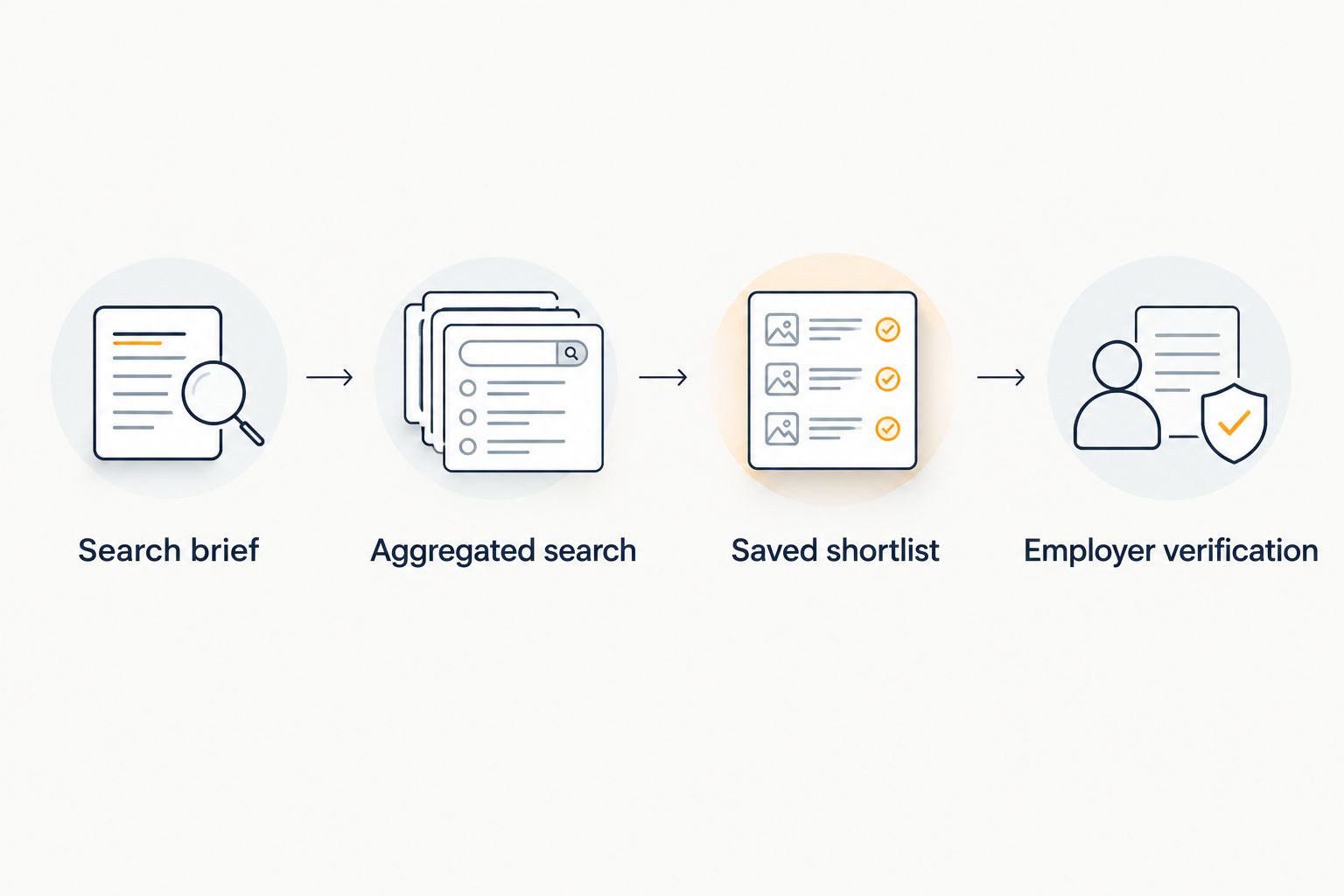
The sequence below summarizes the review process. Each stage has a different purpose; saving an opportunity does not replace verifying it.
Keep the tracking fields practical
Use fields you will actually update: requirement fit, unresolved question, next action, and date reviewed. Your document is a decision aid, not a second copy of the full advertisement.
For your 2026 shortlist, record when you reviewed a posting without assuming that date is its publication date. Keep a separate field for any posting date explicitly shown by the source.
Your employer verification
- Identify the appropriate contact from the posting. Use the employer's or recruiter's stated application instructions. Do not assume that saving a job submits an application or communicates interest.
- Confirm your non-negotiable requirements. Ask about the actual case mix, schedule, call, location responsibilities, and eligibility requirements. Prioritize the unanswered detail most likely to rule the position in or out.
- Reconcile conflicting information. If the source posting and a later conversation disagree, ask for the current position description. Keep the discrepancy visible until it is resolved.
- Assign a next action. Apply, request clarification, schedule a conversation, or remove the role from consideration. Record what you need before taking the next step.
Expected result: Each shortlisted role has a clear next action supported by the posting or a direct response. You are no longer deciding on the strength of a search result alone.
RadBoard's radiology job search supports discovery and saving; your employer checks establish fit. The benefit is a single starting point across multiple sources. The limit is that aggregation does not establish the clinical or contractual details you must verify.
Build your radiology shortlist
Search 5,000+ radiology positions from 20 sources, then swipe to save relevant opportunities.
Second workflow: refresh the search when your requirements change
Use a second version of the workflow when your geography, schedule, or employment preferences change. This is a repeatable manual review—not a claim that searches, tracking documents, or employer records synchronize automatically.
- Keep 2 searches in your notes: your current target and one adjacent alternative. For example, separate an onsite search from a remote search rather than mixing their requirements.
- Change the brief before rerunning the search. Note the new requirement and preserve the original request for comparison. Avoid carrying an outdated preference into the revised search.
- Review newly encountered postings against the revised brief. Keep previously rejected roles out unless your reason for rejecting them has changed.
- Update existing tracking rows before creating new ones. Compare employer, location, duties, and identifiers to determine whether you are reviewing a different role or another description of the same opportunity.
Expected result: You can explore an adjacent career option without losing the reasoning behind your original shortlist. In 2026, that gives your search a clear record of decisions rather than an expanding collection of unexplained saved roles.
Troubleshooting
The results are too broad
Rewrite the request around your clinical role and strongest constraint. Replace vague preferences such as flexible work with the schedule or working arrangement you actually need, then read the duties before saving.
The results are too narrow
Remove one preference while keeping genuine requirements intact. Try an adjacent clinical term only when the work fits your training and goals; broader wording is not a reason to overlook an eligibility requirement.
Several postings look like the same job
Compare the employer, location, duties, contact details, and requisition identifier when provided. Keep the relationship unresolved until you have enough evidence, and ask the contact whether the advertisements concern the same opening.
A remote posting leaves essential questions unanswered
Request the shift time zone, required licenses, patient locations, and any onsite duties. Keep the role marked unconfirmed until you have answers; the word remote is not a substitute for those details.
You saved a role but have no application record
Treat saving and applying as separate actions. Follow the posting's stated instructions and record your submission date only after completing that process; do not infer an application from a saved item.
Customize your workflow
Once your discovery process is repeatable, improve the questions you ask rather than adding more search terms. A useful next step is to compare roles on case mix, call, employment structure, and the obligations that matter to you.
Use the guide to comparing radiology job offers beyond base salary when your shortlist reaches the offer stage. Keep search criteria and offer evaluation connected, but do not treat an advertisement as the final statement of employment terms.
FAQ
What is radiology job boards aggregated search?
Radiology job boards aggregated search brings postings from multiple sources into one search experience. RadBoard states that it aggregates 5,000+ radiology positions from 20 sources, with AI-powered search and swipe-to-save features.
Do I need to connect all 20 job sources myself?
This workflow does not require you to connect the 20 sources individually. You search the aggregated positions, review relevant postings, and maintain your own follow-up record.
Does saving a radiology job submit an application?
Treat saving a radiology job as a shortlist action, not an application. Follow the posting's stated application instructions and record completion separately.
How do I search for a subspecialty-only radiology position?
State the subspecialty and your requirement for subspecialty-only work in the search request. Read the full duties and confirm whether general coverage, procedures, or call are also required.
How do I avoid counting the same opening more than once?
Compare employer, location, duties, contact information, and any requisition identifier before creating a new tracking row. Ask the listed contact when two advertisements appear related but the relationship is unclear.
Can I use an aggregated search for remote radiology jobs?
Yes, describe remote work and your clinical requirements in the search request. Confirm required licenses, patient locations, shift time zones, and onsite obligations for each promising posting.
What should I do when a posting leaves out call requirements?
Mark call requirements as unconfirmed and ask the employer or recruiter directly. Do not interpret an omission as a no-call arrangement.
One last thing
Put the most important unanswered question beside every saved role. A shortlist becomes useful when each item tells you what to do next—not simply which titles caught your attention.
Before your next review, remove any entry you cannot explain. Keep the opportunity only when you can name its fit, its unresolved issue, or the action needed to decide.