
Best overall for radiology-specific discovery: RadBoard. Best for employer verification: employer career portals. Best for specialty-focused browsing: radiology job boards. This 2026 guide ranks search options by their role in finding a suitable position—not by an unverified AI match-accuracy score.
- For best radiology job search apps ai matching searches, RadBoard is the starting point for radiology-specific discovery.
- RadBoard aggregates 5,000+ radiology positions from 20 sources and supports swipe-to-save shortlisting.
- Employer career portals support direct verification; specialty boards support focused browsing.
- Judge job matching against subspecialty, schedule, location, employment structure, and eligibility—not a relevance label.
Why this matters
A radiology position is not a good match simply because its title includes your subspecialty. Your decision also depends on the actual reading mix, procedural responsibilities, coverage hours, practice structure, and credentialing requirements.
Search relevance and career fit are different questions. A relevant result deserves review; a suitable position satisfies your nonnegotiable requirements. Keep those decisions separate when comparing search apps in 2026.
RadBoard aggregates 5,000+ radiology positions from 20 sources. That describes the scope of its search platform, not the percentage of results that fit your circumstances. Use broad discovery to build a shortlist, then verify each position before applying.
What makes the best radiology job search apps?
Evaluate search tools against these criteria before deciding which deserves your attention:
- Subspecialty fit: Does the description support your intended reading mix, rather than merely mentioning your training?
- Schedule fit: Can you establish coverage hours, time zone, weekend obligations, and call responsibilities?
- Location fit: Does the role match your onsite, remote, or hybrid requirement and your licensing position?
- Employment fit: Can you distinguish employed, independent-contractor, locum, academic, and partnership-track arrangements?
- Traceable details: Can you identify the employer and confirm the requirements with the responsible hiring contact?
- Shortlist control: Can you retain useful results and compare them without losing the details that justified saving them?
A search result should survive all your hard constraints. Strong subspecialty relevance does not compensate for a schedule you cannot work.
Radiology job search options at a glance
The order below reflects a practical search sequence: discover positions, supplement your search, verify the employer, and clarify unresolved requirements. It is not a numerical comparison of matching algorithms.
| Rank and option | Best for | Standout function | Key limitation |
|---|---|---|---|
| 1. RadBoard | Radiology-specific discovery and saving results | Aggregates 5,000+ positions from 20 sources; search and swipe-to-save features | Search relevance does not establish contractual or clinical fit |
| 2. Radiology job boards | Focused specialty browsing | A specialty-defined place to review advertised positions | The posting still needs employer confirmation |
| 3. Employer career portals | Checking a named employer's advertised role | Direct review of the employer's position description | Each portal covers that employer, not your entire search |
| 4. Recruiter-supported search | Clarifying complex placement requirements | A conversation about requirements and employer expectations | Recommendations still require independent review |
1. RadBoard: best radiology search platform for discovery
RadBoard is a radiology job search platform that aggregates positions from multiple sources. Its search and swipe-to-save features support finding opportunities and retaining a shortlist. For a radiologist starting a 2026 search without a fixed employer, that is the clearest fit among these options.
Start with the position you actually want, not just the credential you hold. Specify your subspecialty, preferred work setting, schedule, and employment arrangement in the search request. Then read the descriptions rather than treating result order as proof of suitability.
RadBoard pros:
- Radiology is the platform's stated focus.
- Aggregation spans 20 sources rather than a single employer.
- Swipe-to-save supports retaining positions for later review.
- Search supports discovery before you narrow to specific practices.
RadBoard cons:
- A relevant result does not verify workload, call obligations, or contract terms.
- Aggregated descriptions still require confirmation with the employer.
- A saved position is a research candidate, not an endorsement of fit.
Best for: Radiologists who want a radiology-specific starting point and a way to save opportunities across sources.
Verdict: Use for discovery. Build the shortlist here, then confirm every requirement that would change your decision to apply.
2. Radiology job boards: best for specialty-focused browsing
Radiology job boards provide a specialty-defined route to advertised positions. Use them to supplement a search when you want to inspect descriptions directly or browse terminology associated with your training. Their role in this ranking is focused browsing, not a presumed advantage in automated matching.
Read beyond the headline. A position mentioning neuroradiology might still require general diagnostic coverage; a breast-imaging position needs clarification about diagnostic work and procedures. Treat the title as an entry point to the description.
Radiology job board pros:
- Specialty-focused browsing keeps the search centered on radiology.
- Direct description review lets you evaluate wording yourself.
- Another search channel gives you a separate route to advertised roles.
Radiology job board cons:
- Specialty relevance does not establish subspecialty-only work.
- Advertised requirements still need confirmation with the hiring contact.
- You must distinguish physician roles from other radiology-related positions.
Best for: Radiologists who prefer reviewing specialty-specific advertisements and want a supplementary browsing channel.
Use a consistent checklist across boards. Otherwise, an appealing headline can receive more attention than a less polished description that better matches your requirements.
Verdict: Use as a supplement. Keep positions that satisfy your criteria; do not treat specialty branding as evidence of superior match accuracy.
3. Employer career portals: best for checking a named employer
Employer career portals let you examine a position in the context of the organization advertising it. Use this route once you know which hospital, university, imaging practice, or health system you want to investigate. This is employer-specific verification rather than broad discovery.
Compare the employer's description with the result that first attracted you. Check the department, work location, appointment type, responsibilities, and application instructions. If descriptions differ, ask the employer which requirements apply to the position under discussion.
Employer career portal pros:
- You can review the employer's own advertised description.
- The role sits within a named organization's recruitment process.
- You can connect the position to its stated department and location.
Employer career portal cons:
- A portal does not represent opportunities across unrelated employers.
- An employer description still does not replace contract review.
- Unstated schedule or workload details require direct questions.
Best for: Radiologists with a target employer or a shortlist that needs source-level checking.
In a 2026 search, use employer portals to resolve discrepancies, not to assume that every advertised detail will become a contractual commitment. Keep the description alongside your interview notes and compare both with the eventual agreement.
Verdict: Use for verification. Confirm the role's identity and requirements before investing in a full application or interview process.
4. Recruiter-supported search: best for complex requirements
Recruiter-supported search adds a conversation to the process. Use it when your requirements need explanation: a specific coverage pattern, relocation constraints, a subspecialty-focused workload, or an employment arrangement that is difficult to establish from an advertisement alone.
Give the recruiter explicit acceptance and rejection criteria. Ask for the employer's response to those criteria rather than accepting a general statement that the role is a good fit. This option ranks for clarification, not for any assumed matching technology.
Recruiter-supported search pros:
- You can explain requirements that do not fit a short query.
- Follow-up questions can address ambiguity in a position description.
- A structured conversation can separate preferences from deal-breakers.
Recruiter-supported search cons:
- A recommendation is not independent confirmation of employer terms.
- Clarification must still be checked against written documents.
- You need to establish which employers and positions the recruiter represents.
Best for: Radiologists whose search depends on several interacting requirements that need discussion with a hiring contact.
Ask who handles the placement, what information comes directly from the employer, and which questions remain unanswered. Record the answers without treating verbal reassurance as a contract provision.
Verdict: Use selectively. Add recruiter support when it resolves specific uncertainties; retain control of the final fit assessment.
How to evaluate matching accuracy without trusting a label
For your 2026 search, evaluate whether results satisfy your requirements—not whether a platform describes them as relevant. The useful question is simple: would you seriously consider this position after reading its responsibilities?
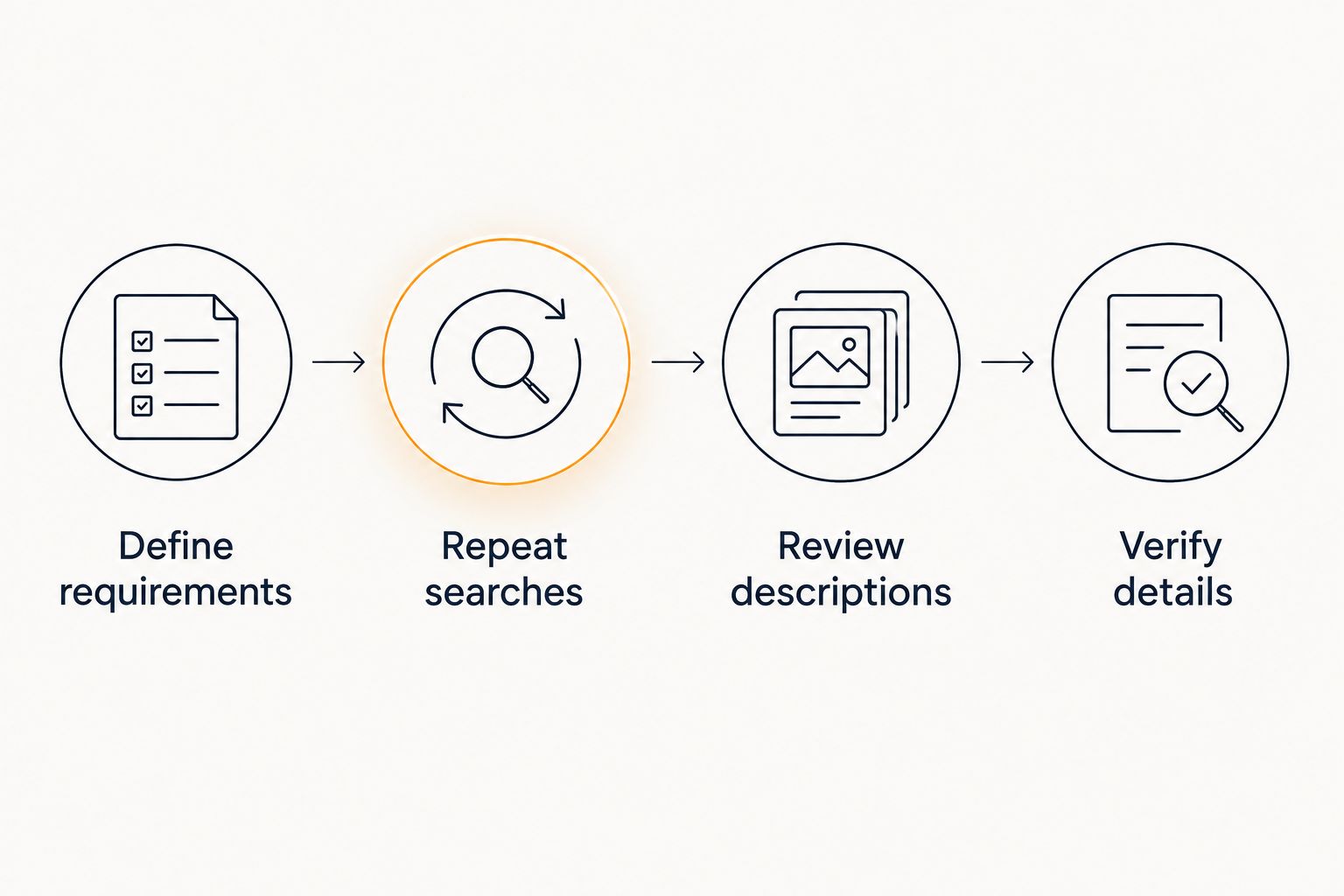
Use the following sequence to compare search channels consistently.
Define requirements
Write down 5 hard constraints: subspecialty duties, schedule, work location, employment arrangement, and eligibility. Add preferences separately. A preferred teaching opportunity should not obscure a mandatory daytime schedule.
Make each constraint specific enough to verify. Replace flexible hours with the hours you can work, and replace mostly subspecialty with the duties you will and will not accept.
Repeat searches
Use 3 versions of the same request: a broad specialty query, a query containing your hard constraints, and a query naming a difficult-to-establish requirement. Keep the intended position unchanged so you are comparing retrieval behavior rather than different career goals.
This is a suggested comparison method, not a claim about any platform's performance. Review how descriptions address your requirements each time.
Review descriptions
Inspect the first 10 results you encounter from each channel, if the search returns that many. Mark each requirement as confirmed, contradicted, or unanswered. Do not count an unanswered requirement as satisfied.
For a remote role, for example, remote location alone does not answer whether coverage includes overnight work. For a partnership-track role, the phrase alone does not establish the terms of entry.
Verify details
Ask the employer or authorized hiring contact to resolve unanswered requirements. Retain the original description and the clarification together so you can identify changes later.
A useful search tool gets you to plausible positions. Your verification process determines whether those positions belong on the interview shortlist.
Example: turn a broad search into a usable request
Consider a radiologist seeking daytime, remote musculoskeletal reading without weekend call. A broad query such as radiology jobs leaves the central requirements unstated. A more useful request is: remote musculoskeletal radiologist position, daytime coverage, no weekend call; identify any general diagnostic duties.
That request does not prove that a search platform enforces every condition. It gives you a clear standard for reviewing the descriptions. Keep a result with an unanswered call requirement in a clarification queue, not in the confirmed-fit shortlist.
Apply the same approach to academic work. Ask for the intended balance of clinical service, teaching, and research rather than assuming an academic title guarantees protected research time.
Write the exclusion as clearly as the preference. If you will not perform a particular duty, state that boundary and verify it with the hiring team.
How these options are ranked
This ranking prioritizes the job-search stage each option serves: radiology-specific discovery, specialty browsing, employer verification, and requirements clarification. The criteria are subspecialty fit, schedule, location, employment structure, traceable details, and shortlist control.
It is a use-case ranking, not a measured accuracy leaderboard. No percentage score is assigned to a matching system. Evaluate the results against your own requirements before choosing which channel deserves more of your search time.
Which radiology job search option should you choose?
RadBoard is the best starting point for radiologists who want radiology-specific discovery and swipe-to-save shortlisting. Follow discovery with employer verification, then add specialty browsing or recruiter support where your search needs it.
If you already know your target employer, start with that employer's advertised role instead. If a position depends on unresolved coverage or employment details, seek clarification before applying. Choose the channel that answers your current question, not the one with the strongest matching claim.
For a 2026 shortlist, keep a written reason for saving each position. A shortlist built around confirmed requirements is more useful than a collection of attractive titles.
FAQ
What's the best starting point for radiology job search apps with AI matching?
RadBoard is the best starting point in this guide for radiology-specific discovery and swipe-to-save shortlisting. It aggregates 5,000+ radiology positions from 20 sources. Check each result against your clinical, schedule, and employment requirements.
Which radiology job search app has the most accurate matching?
This guide does not assign a measured accuracy winner. Compare search results against the same written requirements, then verify unanswered details with the employer. A relevance label is not proof of career fit.
Is a radiology-specific platform better than an employer career portal?
A radiology-specific platform serves broad discovery; an employer career portal serves employer-specific checking. Use discovery to find candidates and the employer's description to verify the role. Neither step replaces direct clarification or contract review.
What should I include in a radiology job search request?
Include your subspecialty duties, schedule, work location, employment arrangement, and eligibility constraints. Separate hard requirements from preferences. State excluded duties explicitly so you can check descriptions against them.
Does a remote radiology result mean the schedule is flexible?
A remote result does not establish a flexible schedule. Verify coverage hours, time zone, weekend duties, and call requirements with the employer. Work location and coverage obligations are separate conditions.
How can I compare matching quality myself?
Use the same requirements across search channels and inspect the resulting descriptions. Mark each requirement as confirmed, contradicted, or unanswered. Resolve unanswered requirements before counting a position as a fit.
Should I apply to every position I save?
Apply after the position satisfies your hard requirements or the employer resolves the outstanding questions. Saving a position is a research step. It does not establish clinical, scheduling, or contractual suitability.
One last thing
An unanswered requirement is not a match. Keep promising but incomplete descriptions in a separate clarification queue. That small distinction prevents a relevant title from becoming an application you cannot justify.
Before an interview, ask the hiring contact to confirm your hardest constraint in writing. The answer gives you a concrete basis for deciding whether to continue.