
Choose RadBoard if you want a radiology job search platform that brings together 5,000+ positions from 20 sources; choose ZipRecruiter if your search extends across occupations or includes a non-radiologist partner. For 2026, the deciding axis is specialty focus versus cross-industry breadth—not which platform guarantees a better offer.
- RadBoard vs ZipRecruiter comes down to radiology-specific discovery versus a broader job search.
- RadBoard aggregates 5,000+ radiology positions from 20 sources and supports swipe-to-save.
- ZipRecruiter is the better starting point when you need to explore jobs across occupations.
- Neither platform replaces employer verification of case mix, call obligations, or contract terms.
Why this matters
A radiologist needs more than a matching job title. The useful questions concern subspecialty work, reading location, call coverage, employment structure, and the actual practice hiring you.
A specialty-focused platform and a general employment marketplace serve different search goals. Start with the platform that matches your intended work, then judge individual opportunities against the same requirements. A larger search universe is not automatically a more relevant shortlist.
For your 2026 search, decide whether you are choosing among radiology positions or reconsidering your career category. That distinction determines which platform deserves your attention first. It also prevents you from comparing a specialty platform’s listing count with a general marketplace’s total inventory as though those numbers measure the same thing.
At a glance
| Dimension | RadBoard | ZipRecruiter |
|---|---|---|
| Best for | Radiologists comparing career opportunities | Job seekers exploring multiple occupations |
| Radiology discovery | Aggregates 5,000+ radiology positions from 20 sources | General job marketplace that includes healthcare roles |
| Career breadth | Radiology-focused search | Cross-industry search |
| Standout workflow | Search and swipe-to-save | Broad employment discovery |
| Household search | Focused on the radiologist’s search | Useful when household members seek different occupations |
| Offer verification | Employer confirmation still required | Employer confirmation still required |
| Pricing model | Evaluate candidate-access terms separately from recruitment services | Distinguish candidate access from employer recruiting plans |
The table compares scope and search purpose, not placement success. It does not establish that either platform has exclusive opportunities, more accurate listings, or faster hiring. Choose the search environment first; evaluate the employer second.
Specialty aggregation wins for radiology discovery
RadBoard is the better starting point for radiologists who want a specialty-focused job search. Its stated scope is concrete: 5,000+ radiology positions aggregated from 20 sources, with search and swipe-to-save features.
Aggregation gives you a place to review positions collected from multiple sources. The limitation is equally important: the stated listing count does not establish how many distinct employers, unique vacancies, or suitable subspecialty positions you will find.
Use the platform’s scope to begin discovery, not to predict your outcome. A breast imager seeking procedural work and a general diagnostic radiologist seeking overnight coverage need different shortlists, even when they begin in the same radiology-focused environment.
Before saving a role, identify:
- Whether the position is for a physician radiologist.
- Whether its clinical duties match your training.
- Whether its location and working arrangement fit your plans.
- Whether the employer or recruiter identifies the hiring practice clearly.
The specialty platform wins on focus, not on a demonstrated hiring-success rate. You still need to read the listing rather than treating its presence in a radiology search as proof of fit.
ZipRecruiter wins when your career search crosses occupations
ZipRecruiter is the better option when you are exploring multiple occupational categories. Its general employment scope fits a broader question: what kinds of work should you consider, rather than which radiology practice should you join?
That distinction matters if you are investigating a career change. A physician considering clinical work alongside management, consulting, or other employment paths needs a search that does not begin and end with radiology positions.
The tradeoff is relevance. Broad occupational coverage is useful for exploration, but you must check whether each result requires your credentials and offers the responsibilities you want. A healthcare label alone does not establish that a position is appropriate for a radiologist.
For a 2026 career transition, separate exploratory searches from clinical searches. Use different criteria for each. A clinical role needs scrutiny of case mix and coverage; a nonclinical role needs scrutiny of duties, reporting relationships, and required experience.
ZipRecruiter wins on career breadth; specialty aggregation wins when you have already chosen radiology as your destination. Neither advantage proves that a particular employer is a better match.
Swipe-to-save suits an established radiology shortlist
RadBoard’s swipe-to-save feature is a concrete reason to consider it when your task is collecting radiology opportunities for later review. Search identifies candidates; saving preserves the positions you want to examine more closely.
Keep those actions separate. Saving a listing is not an application, an employer endorsement, or confirmation that its terms meet your requirements. It is a shortlist decision.
The useful workflow is to save a role only after it passes your initial criteria, then record the questions the listing leaves unanswered. Otherwise, your saved collection becomes another unfiltered results page.
For example, a remote-reading opportunity deserves follow-up on working hours, clinical scope, equipment responsibilities, and licensing expectations. The word remote does not answer those questions by itself.
The saving workflow is useful for radiology discovery, but saving alone does not make a position suitable. This is a workflow-fit advantage, not evidence that ZipRecruiter lacks saving tools or that either platform produces better recommendations. Assess the interface by whether it helps you maintain a shortlist you can actually review.
ZipRecruiter wins for a household search across different fields
ZipRecruiter’s broader scope is useful when relocation involves more than a radiologist’s career. If your partner works outside radiology, a general employment marketplace supports searches across different occupations within the same geographic decision.
A radiology-focused platform addresses your clinical opportunity search. It does not, by that focus alone, answer whether the destination also supports your partner’s profession.
Build separate shortlists, then compare locations. Your clinical opportunity and your partner’s employment prospects are related decisions, but they should not share identical search criteria.
For a household planning a 2026 move, define which conditions are mandatory before pursuing interviews:
- A location both household members will consider.
- A clinical arrangement you are prepared to accept.
- A realistic occupational search for the other household member.
- A relocation timetable you can discuss with prospective employers.
ZipRecruiter wins this scenario because the problem crosses occupational boundaries. That does not make it the stronger radiology-only search. Keep each platform assigned to the task its scope supports rather than expecting one marketplace to settle the entire relocation decision.
Both require employer verification before an offer deserves confidence
Neither search platform substitutes for direct employer answers. Treat each listing as an introduction to a conversation, not as a complete description of the position.
For radiology work, verify the actual employer, practice structure, clinical responsibilities, and coverage expectations. A familiar title does not establish how the working day operates.
Ask questions that produce specific answers:
- Case mix: Which studies and procedures will you cover?
- Schedule: What are the assigned hours, weekend obligations, and call responsibilities?
- Practice structure: Who employs you, manages the practice, and makes staffing decisions?
- Workload: How does the practice define productivity and distribute cases?
- Support: Who handles technical problems, consultations, and coverage gaps?
Apply these questions to opportunities from either platform. If a recruiter answers on the employer’s behalf, establish which details the hiring practice has confirmed.
Offer verification is a tie: both searches require the same diligence. A platform’s specialty focus or occupational breadth does not resolve missing contract details. Move unresolved questions into the interview agenda before you become invested in the role.
Pricing: compare candidate access, not employer recruiting packages
Keep your job-search decision separate from an employer’s recruiting purchase. Candidate access, optional services, and employer recruitment arrangements are different transactions; comparing them as one pricing model produces the wrong decision.
For either platform, review the current terms attached to the action you intend to take. Establish whether you are browsing, saving, applying, or purchasing a separate service. Do not assume that terms for one action describe another.
Use the same questions in your 2026 review:
- What does the candidate account let you do?
- Does the specific service involve an ongoing commitment?
- What are the cancellation terms for any service you purchase?
- Are you evaluating a candidate feature or an employer product?
Predictability matters when a service creates a recurring commitment. Flexibility matters when you want to use a service for a defined search without continuing obligations. Those are contract questions, not reasons to infer a platform’s candidate terms from its employer offering.
There is no pricing winner in this comparison. Choose on search fit, then check the applicable terms before committing.
Use the same shortlist process on both platforms
A fair comparison starts with the same requirements. Do not judge one platform using a tightly defined search and the other using a broad job title.
Use this sequence for your 2026 search. It separates discovery from verification and gives each saved role a clear next step.
Define requirements
Write down your mandatory clinical and working conditions before searching. Include subspecialty scope, acceptable geography, onsite or remote work, call tolerance, and employment structure.
Distinguish requirements from preferences. If you will not accept overnight coverage, that is a screening condition. If you prefer a particular practice setting but will consider others, keep it as a comparison factor rather than an automatic rejection.
Search consistently
Use equivalent role descriptions and geographic assumptions on both platforms. Keep clinical searches distinct from exploratory career searches so that the results answer the same question.
Read the full description before classifying a result. Similar titles can describe different work, while differently worded titles can merit the same follow-up questions.
Verify details
Confirm the hiring entity and the responsibilities attached to the role. Where a description is incomplete, ask the employer rather than filling the gap with assumptions.
Check whether listings describe the same underlying opportunity before treating them as separate options. Aggregation and broad marketplace coverage are discovery mechanisms, not proof that every result represents a distinct vacancy.
Compare offers
Create a consistent record for each role. Use columns for case mix, schedule, location, practice structure, employment arrangement, and unresolved questions.
Compare documented answers rather than the polish of the advertisement. An attractive listing with unclear coverage obligations is not ready for the same level of confidence as a role whose employer has answered your questions.
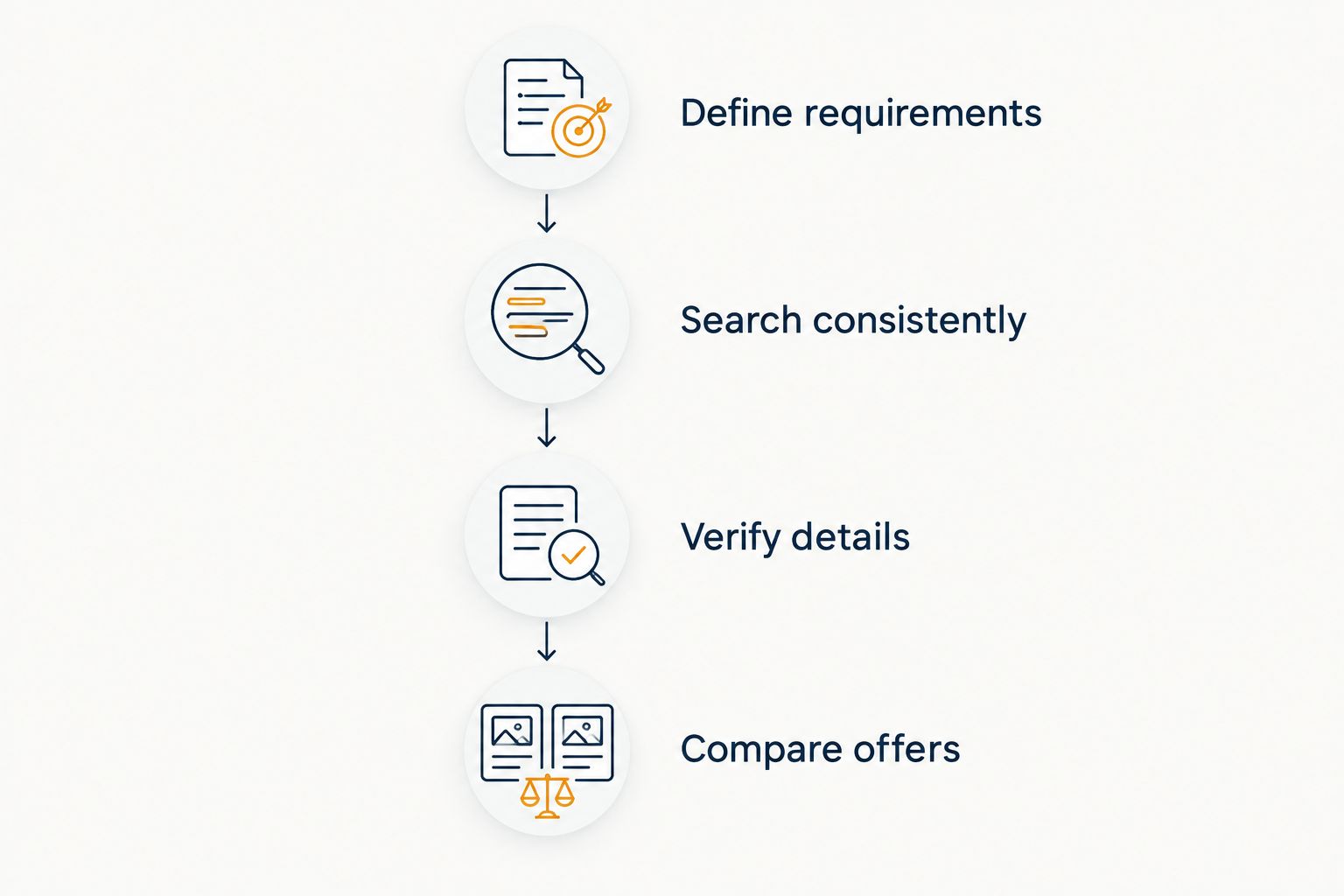
Your comparison record does not need to be elaborate. Its purpose is to expose unanswered questions and stop a compelling job title from outweighing the conditions under which you would actually work.
Final verdict: choose by search scope
Choose the specialty platform for a radiology-focused search
Choose RadBoard if you are a radiologist comparing clinical career opportunities and want aggregated radiology positions with a swipe-to-save workflow. This profile includes physicians who know their intended field and need to identify employers worth contacting.
The advantage is focus. The limitation is that discovery still leaves employer verification, interviews, and contract review to you.
Choose ZipRecruiter for a cross-occupation search
Choose ZipRecruiter if you are exploring different occupations or coordinating a move with a partner whose career sits outside radiology. This profile benefits from a general marketplace rather than a specialty-only starting point.
The advantage is breadth. The limitation is that broad results require you to establish clinical relevance rather than assuming it from the marketplace’s healthcare coverage.
| Dimension | Winner |
|---|---|
| Best for | Specialty platform for radiologists; ZipRecruiter for cross-occupation seekers |
| Radiology discovery | Specialty platform |
| Career breadth | ZipRecruiter |
| Standout workflow | Specialty platform for the stated swipe-to-save workflow |
| Household search | ZipRecruiter when occupations differ |
| Offer verification | Tie: verify directly with employers |
| Pricing model | No winner: review the applicable candidate terms |
FAQ
Is RadBoard better than ZipRecruiter for radiologists?
RadBoard is the better starting point for a radiology-focused search because it aggregates 5,000+ radiology positions from 20 sources. That scope does not establish better hiring outcomes or remove the need to verify each role with its employer.
When should I choose ZipRecruiter instead?
Choose ZipRecruiter when your search crosses occupational categories or includes a partner working outside radiology. Its general employment scope fits those broader search goals.
Does a larger job count mean a better radiology search?
No, a larger job count does not establish a better radiology search. Compare relevant roles against your clinical requirements, and check whether multiple listings describe the same opportunity.
Can I use both platforms for the same job search?
Yes, you can use both platforms with the same clinical and geographic requirements. Keep one comparison record so that repeated listings do not become separate applications by mistake.
How should I compare the cost of using these platforms?
Compare the current terms for the candidate action you intend to take, separately from employer recruiting products. Check access, commitments, and cancellation terms before purchasing any optional service.
What should I verify before applying for a radiology position?
Verify the hiring entity, clinical scope, location, schedule, and coverage expectations. Record unanswered questions and ask the employer or its authorized recruiter for clarification.
Does saving a radiology job mean I have applied?
Saving a job is a shortlist action, not proof that an application has been submitted. Follow the application instructions for the specific opportunity and confirm your next step.
One last thing
The search platform is not the practice you will join. A focused results page helps you discover opportunities, but your decision rests on the employer’s answers and the terms of the role.
Before an interview, write one sentence stating the condition you will not compromise: clinical scope, call burden, working location, or another requirement. Ask about that condition early. It is a more useful screening tool than treating every attractive listing as an equally serious option.