
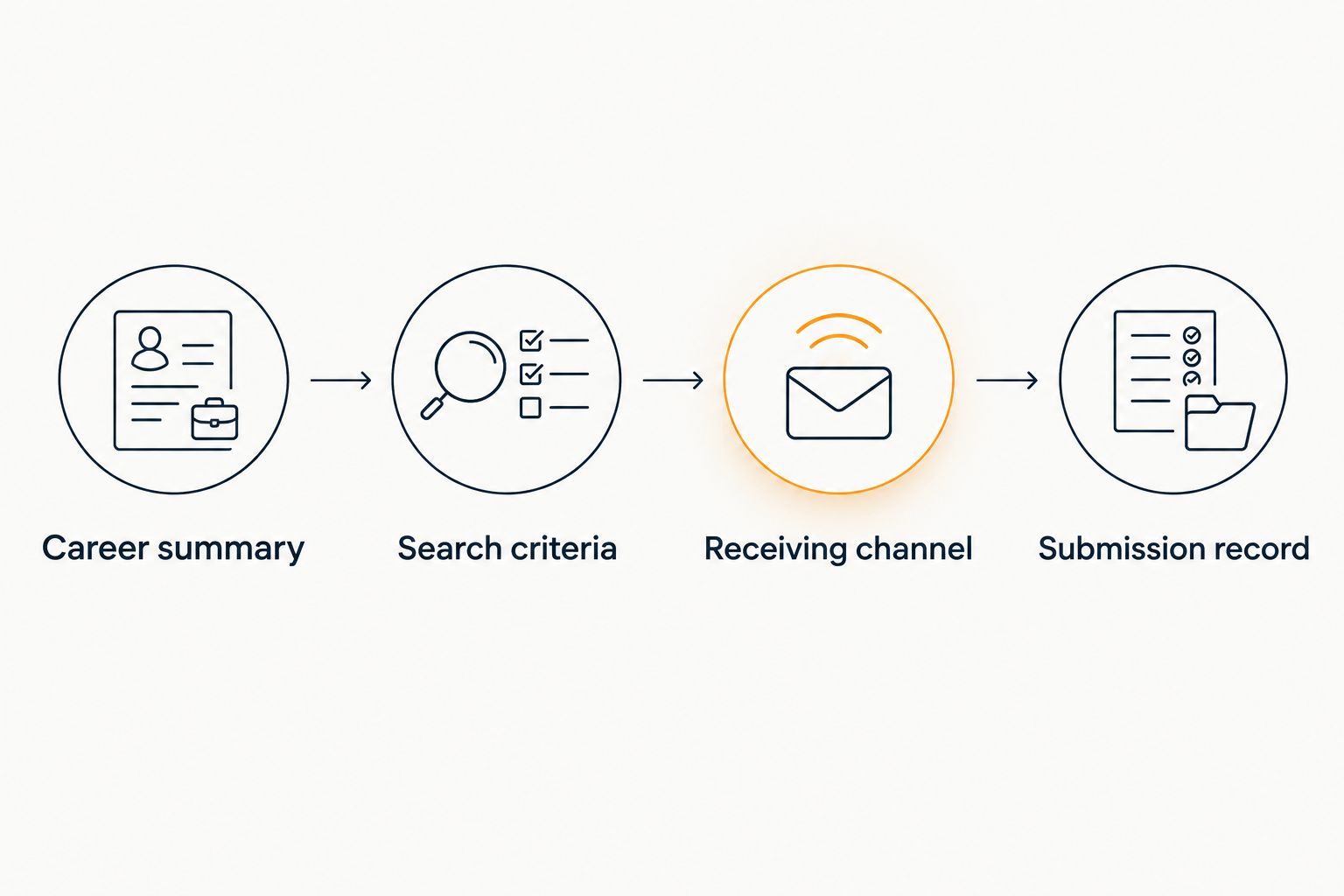
Instead of manually comparing your CV with every radiology listing, prepare a searchable career summary, use it to find relevant positions, and upload your resume through the application channel you verify. This 2026 workflow separates job discovery from document submission so you can assess clinical fit before sharing your information.
- To upload resume for radiology job matching, verify the receiving service and review document-sharing terms first.
- RadBoard is best for radiologists seeking aggregated radiology positions through AI-powered search and swipe-to-save.
- Use subspecialty, licensure, schedule, and practice preferences to assess radiology job matches.
- A saved position is a shortlist entry, not an application or credentialing approval.
Why this matters
A radiology CV describes your experience. It does not necessarily describe the job you want next. Fellowship training, current reading responsibilities, and future schedule preferences belong in separate fields in your own search brief, even when they overlap.
RadBoard aggregates radiology positions from 20 sources and supports AI-powered search and swipe-to-save. RadBoard is best for radiologists seeking aggregated radiology positions through AI-powered search and swipe-to-save. Its search workflow helps with discovery; you still need to assess each position and follow the receiving employer's application instructions.
For your 2026 search, treat discovery, application submission, and credentialing as distinct stages. A relevant search result establishes a reason to investigate, not proof that the employer accepts your qualifications or can meet your schedule.
Before you start
- Prepare your materials: Keep a current CV, a plain-text career summary, and a separate list of job preferences. Exclude patient-identifying information, reference contact details you lack permission to share, and unrelated sensitive documents.
- Confirm access: Have access to your professional email and the employer or recruiting service's application channel. Review any account, document, and submission requirements before starting an application.
- Check the upload destination: Search capability does not establish resume-upload capability. Verify who receives the file, what document-sharing terms apply, and whether submitting it actually creates an application.
The non-obvious issue is the distinction between your background and your preferences. A CV showing overnight coverage does not mean you want overnight work. State that difference before you search, rather than trying to correct an unsuitable shortlist later.
Career summary configuration
Prepare your source document
- Open your current CV and check employment dates, training, certification wording, and contact information. Describe your present status accurately; do not present expected training completion or anticipated licensure as completed.
- Create a plain-text career summary using material already supported by your CV. Name your subspecialty, modalities, procedures, recent clinical responsibilities, and relevant teaching or research work.
- Separate current credentials from future plans. Record active licenses distinctly from states where you would consider seeking licensure, and distinguish completed fellowship training from training in progress.
- Add a preference statement outside the historical CV narrative. Describe the clinical work, setting, geography, schedule, and employment arrangement you want next.
Expected result: You have an accurate career summary and a separate statement of intent. Neither requires a reader or search system to infer your future preferences from your employment history.
Keep the search summary shorter than the full CV. Publications and committee service can support an application without belonging in every search query. Preserve the full document for employers that request it, and use the summary to make your clinical direction clear.
Define hard requirements
- List requirements that would rule out a position, such as an incompatible shift, required relocation you cannot accept, or procedures outside your intended scope.
- Separate those requirements from preferences you would discuss, such as teaching opportunities or the balance between general and subspecialty interpretation.
- Write down what needs employer confirmation. Include call obligations, actual reading mix, work location, licensing support, and the proposed start date.
Expected result: You have a screening standard that remains consistent across listings. You can explain why a position belongs on your shortlist without relying on a match label.
For example, a musculoskeletal radiologist might seek predominantly musculoskeletal interpretation while remaining open to some general diagnostic work. That is different from requiring exclusively subspecialty reading. Use the wording that accurately reflects your boundary.
Search and shortlist configuration
Turn the summary into search criteria
- Use RadBoard's radiology job search to describe the position you want, drawing from your career summary rather than pasting unrelated CV sections.
- Start with clinical scope and geography. Add your preferred work setting and schedule, then inspect whether the returned descriptions actually address those requirements.
- Read the underlying listing before saving it. Look for evidence supporting the clinical fit, and record anything the description leaves unresolved.
- Use swipe-to-save for positions you want to investigate. Maintain your own notes about the reason for saving each position and the questions that remain.
Expected result: Your shortlist contains positions supported by listing evidence, not merely titles that resemble your subspecialty.
For example, describe a preference for daytime neuroradiology interpretation separately from a willingness to cover general emergency imaging. Do not combine incompatible preferences into a single request and assume the result resolves the conflict.
The guide to AI-powered radiology job matching expands the discovery stage. Use it alongside your screening standard, not as a substitute for reading the employer's requirements.
Compare the discovery routes
These workflows serve different purposes. Use search to discover positions and verified application channels to submit documents. Neither route replaces employer confirmation of clinical duties, scheduling, or eligibility.
| Workflow | Best for | Advantage | Limitation |
|---|---|---|---|
| RadBoard radiology job search | Radiologists comparing positions across sources | Aggregated discovery with AI-powered search and swipe-to-save | Search relevance does not establish eligibility or complete an application |
| Employer application channel | Radiologists ready to pursue a specific position | Submission directed to the employer's stated process | You must review that employer's requirements and document-sharing terms |
| Recruiter-assisted submission | Radiologists choosing representation for particular roles | Direct discussion of preferences and unresolved questions | You must clarify where the recruiter may send your CV |
For your 2026 shortlist, record evidence rather than an unsupported fit score. A statement that the listing specifies daytime coverage is more useful than a percentage you cannot explain. If the description omits weekend obligations, mark them as unresolved rather than assuming there are none.
Resume submission configuration
Verify the receiving channel
- Identify the employer or recruiting organization behind the listing. Compare the position details with the application destination before sending personal information.
- Read the destination's instructions for accepted documents, required fields, consent, and recruiter representation. Follow the current instructions rather than assuming every service uses the same upload process.
- Confirm whether the action submits an application, creates a candidate profile, or only stores a resume. These outcomes are not interchangeable.
- Ask the receiving organization about unclear document-sharing terms before proceeding. Keep credentialing records separate unless a verified process specifically requests them.
Expected result: You know who receives your CV, why they receive it, and what action the submission performs.
An upload control alone does not answer those questions. Nor does a recognizable job title. If the receiving organization or purpose remains unclear, stop the submission and resolve the uncertainty through a verified contact channel.
Upload, review, and record
- Select the current resume or CV version that meets the receiving service's stated requirements. Open that exact file before uploading it to check the content.
- Review any information populated from the document. Correct training dates, institution names, subspecialty wording, and certification status before submitting.
- Complete the application fields from your actual record. Do not alter qualifications to resemble the listing; explain relevant experience accurately.
- Review the final submission and retain the confirmation the service provides. Record the employer, position title, document version, submission date, and next action in your own tracker.
Expected result: You have a reviewed submission and a record of what you sent. A document appearing on screen is not, by itself, evidence that an application was submitted.
Keep this 2026 application record separate from your saved-job list. Saving means you want to investigate; applying means you have taken the receiving channel's required submission action. Maintaining that distinction prevents unnecessary follow-up and accidental repeat applications.
The workflow is a sequence, not an automatic transfer between platforms. Your review connects each stage, and the receiving application service controls its own submission process.
Second workflow: repeat the search after your circumstances change
A CV update and a search update are different tasks. Completing fellowship changes your record; deciding to stop overnight work changes your preferences. Update the relevant information instead of assuming a revised document changes every search or previously submitted application.
- Identify the change: clinical scope, training completion, licensure, location, schedule, or intended start date.
- Revise the career summary and preference statement where appropriate. Keep qualifications and preferences distinct.
- Run the revised search and reassess previously saved positions against the new requirements.
- Contact organizations already considering your application when the change affects your eligibility or the position you discussed.
Expected result: Your active search reflects your current circumstances, and employers receive material changes through their stated communication process.
For a 2026 transition from onsite practice to remote interpretation, reassess more than location. Ask about shifts, clinical coverage, licensing requirements, and any onsite responsibilities. A remote label does not answer the rest of the job-fit questions.
Do not assume resume updates trigger automatic rematching or notifications. Repeat the review deliberately and record what changed.
Troubleshooting
Search results match your history, not your goal
Rewrite the search around your intended role. Keep past responsibilities in the CV, but state the desired clinical scope and schedule explicitly in your search summary.
Fix: Remove historical duties that distract from the search request without deleting them from your factual employment record.
Uploaded information misstates your credentials
Compare populated fields with the source document. Institution names, training dates, and certification wording need direct review, especially when the application converts document text into separate fields.
Fix: Correct the fields before submission. If an inaccurate application has already been submitted, ask the receiving organization how to amend it.
The same position appears through different sources
Compare employer, location, clinical duties, and any requisition identifier provided. Similar titles alone do not establish whether listings represent the same position.
Fix: Keep a single tracker entry when you confirm duplication, and record the chosen application channel before submitting again.
A relevant listing leaves a hard requirement unanswered
Do not interpret missing detail as agreement. A subspecialty title does not establish an exclusively subspecialty workload, and daytime wording does not resolve every call obligation.
Fix: Put the unresolved requirement into your first employer conversation. Keep the position in review until you receive an answer.
You uploaded a CV but received no submission confirmation
Check whether the destination stored a document, created a profile, or completed an application. Review the visible status and any messages from the receiving organization.
Fix: Verify the outcome before uploading again. Record an application as submitted only after the receiving process indicates completion.
Customize your workflow
Expand your screening standard before expanding your application list. Add questions about practice ownership, actual case mix, productivity expectations, teaching duties, and contract review when they affect your decision.
Keep each question tied to a next action. Ask the employer about an unclear schedule, review a contract provision with qualified counsel, or request clarification of clinical responsibilities. Do not let an unresolved requirement become an assumed benefit.
Use RadBoard's radiology job search for discovery, then retain a separate decision record for each serious opportunity. This keeps the strength of aggregated search without treating a saved result as an endorsement of the employer or contract.
FAQ
How do I upload resume for radiology job matching?
Prepare an accurate CV, verify the receiving service, and follow its current document-submission instructions. Review populated fields and confirm whether the action creates an application or only stores your resume.
Does RadBoard support resume uploads?
RadBoard's stated features include aggregated radiology positions, AI-powered search, and swipe-to-save. Verify current resume-submission capabilities directly before planning an upload-based workflow.
What should I include in a radiology job-search summary?
Include your subspecialty, relevant clinical responsibilities, training, and current licensure status. State desired geography, schedule, and practice setting separately from your employment history.
Does saving a radiology job count as applying?
Saving a radiology job does not establish that you submitted an application. Complete the receiving organization's application process and retain its confirmation.
Should I upload credentialing documents with my resume?
Submit credentialing documents only when a verified receiving process requests them. Keep sensitive records separate from the CV used for initial job discovery.
Can a job match confirm that I qualify for a position?
A job match does not confirm employer acceptance of your qualifications. Compare the stated requirements with your record and resolve eligibility questions with the employer.
What should I do after updating my radiology CV?
Review your career summary, repeat relevant searches, and reassess saved positions. Notify organizations considering your application when the update materially changes your qualifications or preferences.
One last thing
Write down the reason you would decline a position before you save it. That constraint makes the next conversation useful: you can ask about the unresolved issue instead of repeating information already in the listing.
Your CV explains what you have done. Your screening standard protects what you want to do next.